


More Villagers adds nine new villager professions to Minecraft, each with a custom workstation and unique trade items not available from vanilla jobs. The mod supports both Forge and Fabric. Workstations spawn naturally in villages or can be crafted and placed to assign the profession manually. This guide covers installation on a server and client, what each profession offers, and how to adjust the configuration.
How to Download
- Navigate to More Villagers on CurseForge and click Files near the top.

- Scroll down and locate your desired game version.
- Press the three vertical dots on the right and click Download File.

- Save the file to your computer.
For Fabric, follow the same steps using the Fabric version of More Villagers on CurseForge.
Client Installation
Setting up More Villagers on the Minecraft launcher requires either Forge or Fabric installed first, depending on the version downloaded.
- Open your Minecraft launcher and click Installations near the top.

- Locate the modded profile and click its Folder icon.

- Open the mods directory. If one does not exist, create it before continuing.
- Drag and drop the More Villagers file into the mods folder.

- Return to the launcher and click Play on the modded profile.
Server Installation
Before uploading the mod, select Forge or Fabric from the Game File area in the main panel to match the version downloaded.
- Log into your Apex server panel and click FTP File Access near the top left.

- Enter your password and click Login.

- Open the mods directory and click Upload at the top left.
- Drag and drop the More Villagers file into the upload area.

- Wait for the upload to reach 100%, then return to the main panel and generate a new world.
- Click Restart to load the mod.
Modbox Installation
As an alternative to the manual installation, you can install More Villagers on your server using Modbox, our built-in mod browser with direct CurseForge integration.
- Log in to your Apex Hosting account and open your Minecraft server panel.
- On the left side, select
Server Configuration > Modbox.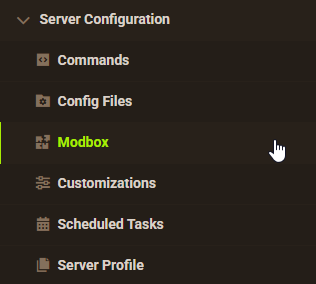
- Search for the mod you want and open its mod page.
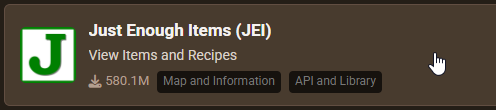
- Select the recommended version for your server, then click
Install.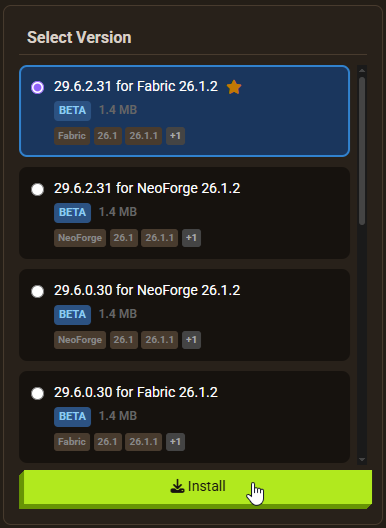
Note: Modbox automatically matches mods to your server's installed version, but does not install dependencies automatically. For more details on using Modbox, check out our full Modbox guide.
More Villagers has no confirmed required dependencies for Forge. If you’re using Fabric, double-check its CurseForge page for any listed dependencies before installing, as none are explicitly named in this guide.
Getting Started
After joining the server, new workstations can be found in villages or crafted using basic materials. Installing the JEI mod makes it easy to look up crafting recipes for each station. To force a villager into a specific profession, place the corresponding workstation near an unemployed villager.


Working Stations
The nine new professions each have a dedicated workstation. The sections below cover what each one offers.
Decayed Workbench
The Decayed Workbench creates a Netherologist villager who trades Nether items across five levels. Early trades include Basalt, Obsidian, and the Pigstep Music Disc. Higher tiers offer rarer Nether resources. This is a practical way to obtain Nether materials without entering the dimension directly.

Hunting Post
The Hunting Post creates a Hunter villager. Players can trade Bones, Gunpowder, and similar mob drops for emeralds. High-tier trades include Outpost Explorer Maps, Ghast Tears, and Slimeballs.

Gardening Table
The Gardening Table creates a Florist villager who trades plant and nature items such as Glow Berries and Moss Blocks. Vines and similar items can be traded for emeralds, making this useful for clearing excess inventory. Higher tiers unlock Jungle and Swamp biome maps.

Blueprint Table
The Blueprint Table creates an Engineer villager who trades redstone components including Observers, Comparators, Hoppers, and Pistons. Redstone dust can be traded for emeralds at lower levels, making it a good source of currency for higher-tier purchases.

Forestry Bench
The Forestry Bench creates a Forester villager. Saplings can be traded for emeralds at lower levels, with higher tiers offering enchanted diamond tools. Other trades allow exchanging emeralds for various wood log types.

Purpur Altar
The Purpur Altar creates an Enderologist villager who trades End dimension materials. Lower tiers exchange Endstone for emeralds. Higher tiers offer Firework Rockets, Shulker Shells, Dragon Heads, and End City Maps.

Mining Bench
The Mining Bench creates a Miner villager. Deepslate blocks trade for emeralds at lower levels. Higher tiers offer an Enchanted Diamond Pickaxe and Mineshaft Explorer Maps. Raw minerals can also be exchanged for other items.

Oceanography Table
The Oceanography Table creates an Oceanographer villager who trades ocean-themed materials: Sponges, Nautilus Shells, Heart of the Sea, and Tridents. Higher tiers offer Buried Treasure Maps. Prismarine materials are the primary currency for emeralds with this villager.

Natural Generation
New workstations generate in villages naturally, but not in every village. Generation is random and only applies to new worlds or chunks that have not yet been rendered. Existing worlds require exploring newly generated areas to find these workstations, or players can craft them directly.

Configuration
The mod’s configuration file allows adjusting workstation generation settings.
- Open your Apex server panel and go to FTP File Access.
- Log in and navigate to the config directory.

- For Forge: locate morevillagers-common.toml and click Edit. For Fabric: locate morevillagers.json instead.

- Make changes, then click Save.

- Restart the server to apply the edits.
To create custom trades or modify existing ones, the CraftTweaker mod is required. The default configuration does not include trade editing options.
Common Issues
Verify the IP address and port or subdomain are entered correctly in the Minecraft launcher. Check that More Villagers is installed on both the client and the server with matching versions. A mismatch between client and server mod versions will prevent connection.
If no new workstations are visible, confirm the mod file was uploaded to the mods folder in FTP and not another directory. Restart the server after uploading. If the mod is installed correctly but new jobs still do not appear in the current world, generate a new world: new workstations only spawn in chunks generated after the mod is installed. Fabric users should also verify all required dependencies are present.
Conclusion
More Villagers expands Minecraft’s villager trading system with nine professions covering Nether resources, ocean loot, redstone components, mining gear, and more. Installing the mod on an Apex Minecraft server requires uploading the file through FTP and selecting the matching Forge or Fabric game file. To give yourself operator permissions for testing, see the guide on how to OP yourself in Minecraft.
Useful Links
More Villagers on CurseForge
Official Wiki for More Villagers
How to Add Mods to a Minecraft Server
Becoming a Minecraft Server Operator






















