

Whether you’re wanting to start your own small survival world or create a large public community, finding the right Minecraft server host can be overwhelming. You need reliability, speed, and support that will never leave you stranded when things go wrong, along with full control over the server.
That’s where Apex Hosting comes in – we were founded in 2013 and have many years of experience with satisfied customers. At Apex we offer Java and Bedrock servers, RAM-based plans with no player slot limit, and one-click modpack installations. We give you tons of customization options, control, and management tools to make your multiplayer experience better.
With a high Trust Pilot score, we go above and beyond to support our customers. With a 24/7 support team, we will always assist and answer your questions at any time. We also provide highly detailed guides and tutorials to help you install mods, plugins, switch game versions, set up complex configurations, and so much more.
What You Get with an Apex Minecraft Server
When you fire up an Apex server, you get a fully optimized, lag-free environment designed specifically for Minecraft. Every server comes standard with:
- Instant Setup: Your server is online and ready to play within minutes of your purchase.
- Global Server Locations: With data centers in North America, South America, Europe, Asia, and Australia, you can select the location closest to your player base for ultra low latency.
- Ryzen and NVMe Hardware: Powered by AMD Ryzen processors clocking up to 4.8 GHz, high speed NVMe SSD storage, and enterprise DDR4 memory to maintain a steady 20 TPS with instant chunk loading.
- Automated Backups: Never lose your progress. Offsite automated backups ensure your world is safe from griefers or accidental corruption.
- Advanced DDoS Protection: Our enterprise level DDoS protection covers attacks up to 300 Gbps, keeping your server online against malicious attacks.
- Subdomain & MySQL: We provide a free, customizable subdomain for players to use when joining the server, along with a MySQL database for plugins, mods, and more.
Platforms and Crossplay
Minecraft isn’t exclusive to a single platform, and neither are our servers at Apex Hosting. We support both Java Edition (PC, Mac, and Linux), and Bedrock Edition (Xbox, PlayStation, Nintendo Switch, iOS, Android, and Windows 10/11 Store). Want the best of both worlds?
With one-click, you can easily enable crossplay by using the GeyserMC plugin on a Java server. This allows your console and mobile friends to join the exact same world as your PC friends, bridging the gap and keeping your entire friend group together. Console players can follow Apex’s join guides for Xbox/Switch and PlayStation.
Settings, Datapacks, & File Management
We believe your server should be exactly that: yours. Apex gives you full control over your server settings, datapacks, and files. Whether you want to tweak the general settings, adjust advanced config files, or set up popular datapacks, our Apex server panel makes it simple.
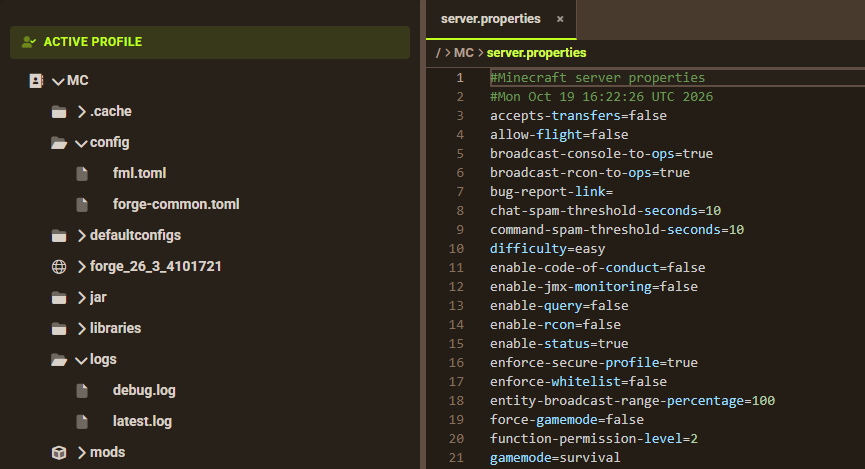
There’s no limit. You can manage all the files on your server via the FTP panel. This is where you can upload, download, edit, or remove any file and folder. This is perfect if you want to download worlds and share them with friends or use them as a custom backup on your own PC.
Mods, Plugins, & Version Switching
You want to install mods or plugins? Sure thing! Apex servers fully support Forge, Fabric, NeoForge, Spigot, Paper, PurPur, and even custom server jar files. Simply choose the type you want and specific game version, then reboot the server to apply the changes. Afterwards, you can begin installing mods and plugins.
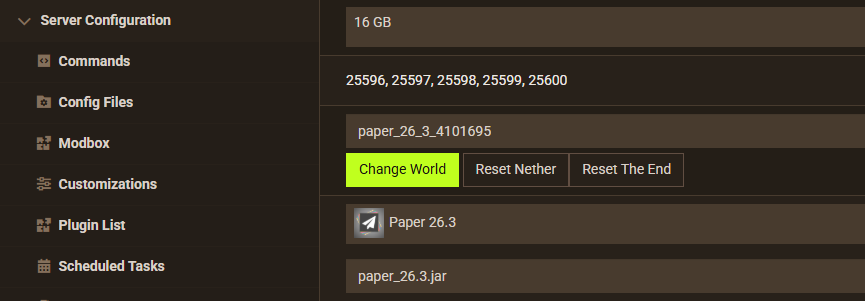
You can set this up with the FTP panel (manual) or our easy-to-use Modbox installer (automatic). If you have the files downloaded, upload them – otherwise, search for what you want and click install to get them working on your Minecraft server.
Modpacks Server Hosting
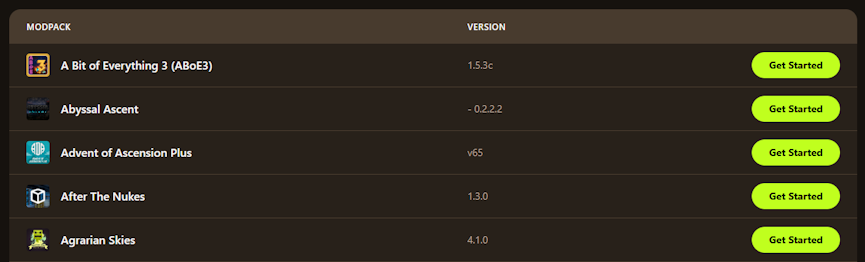
Setting up modpacks on your Apex server is so easy, it should be a crime. We offer a one-click installer feature on the panel with tons of available modpacks. Simple search and select it when you switch the server type, then restart the server to get it automatically installed.
Our modpacks come from the source: CurseForge, FTB, Technic, and Voidswrath. Choose any and start playing! When you’re finished, you can select another pack to begin a new adventure with friends. Apex also offers a custom modpack creation service: up to 25 mods for $15.00 or up to 50 mods for $25.00.
A Quick Tour of the Control Panel
Our customized version of Multicraft, the industry standard, is more intuitive than anything else on the market. It’s mobile friendly and packed with features, meaning you can manage the server from anywhere and still have all the necessary tools. From the server panel, you can:
- View your server live console to track errors, events, and send commands.
- Manage players by kicking, banning, granting operator status, or whitelisting.
- Schedule automated tasks like daily restarts, server messages, or automated backups.
- Access the file manager to edit configurations directly in your browser.
- Give friends access on the Users page, with their own role and FTP access.
How RAM and Pricing Work
At Apex Hosting, we keep pricing transparent. You do not pay for player slots – in fact, all our plans come with unlimited player slots. Instead, you select a plan based on the amount of RAM your server needs.
- Basic Plans (2GB to 3GB): Perfect for small groups playing vanilla Minecraft or using a few lightweight plugins.
- Mid Tier Plans (4GB to 6GB): Ideal for larger player bases, moderate plugin usage, or small to medium modpacks.
- High Tier Plans (8GB and above): The go to choice for massive communities, heavy modpacks, and demanding gamemodes.
The best part is that you are never locked in. You can upgrade or downgrade your RAM at any time directly from your billing area, and the changes apply instantly. For more information, click here.
The Real Question: Why Apex Hosting?
Hardware and control panels are important, but what truly sets Apex apart is our 24/7 Live Chat Support and long-time reputation as the leading hosting provider for Minecraft. Whether it is two in the afternoon on a Tuesday or three in the morning on a holiday, our team of experts is available to help you troubleshoot crashes, install mods, or configure your server. With custom intuitive panels, endless customization, one-click installers, and so much more, it’s easy to see why hundreds of thousands of players trust and use Apex Hosting.
Get started today and save 25% off your first invoice for hosting a Minecraft server!
Frequently Asked Questions
Can I upload a singleplayer world to my server?
Yes, you can easily upload an existing singleplayer or custom world from another host or PC using our FTP panel. Click here to learn how to do that on Java Edition. Review this guide to do that on Bedrock Edition.
Do you offer dedicated IPs?
Yes. You can purchase a dedicated IP as an addon during checkout or anytime after purchasing. This removes the need to type a port number at the end of your server address. Every order includes a free subdomain, such as yourserver.apexmc.co or youserver.mc.gg. This makes your server more professional and easy to remember.
What if I don’t know how to install a specific mod or plugin?
We have an extensive knowledgebase with tutorials for installing mods and plugins, along with many other topics. If you get stuck, you can always reach out to our support team – they’re ready to assist.
Is there a money back guarantee?
Absolutely! We offer a seven day money back guarantee so you can ensure our services are worth it, completely risk free.
Which Minecraft server package is best value for a small group of friends?
We recommend a 3-4GB Minecraft server to play with a small group of friends. These servers allow you to play with plugins, mods, and some modpacks.
I want to run a modded Minecraft Java server with a big modpack like All The Mods. Why should I use Apex Hosting?
Apex Hosting offers many All The Mods (ATM) modpacks with a one-click installer, making it a seamless process to set up and start playing with friends. You can switch between modpacks at any time during your sessions.
I need a Minecraft server my kids can join from Xbox, Switch and PC. Is this possible at Apex?
Yes, you can easily set up a Minecraft server at Apex Hosting that allows crossplay between Xbox, Nintendo Switch, PC, and even PlayStation. Simply enable the Geyser Installer in Customizations from your server panel, restart the server to allow crossplay support.






















