You launch Minecraft on Xbox, PlayStation, Nintendo Switch, or Windows, ready to play with friends, and “Error Code: Drowned” stops you cold. The message blocks your Microsoft account sign-in, so multiplayer, Realms, and cross-platform play all go dark until it clears. Mojang now publishes a dedicated troubleshooting flow for this exact error, and it works alongside the community fixes that have helped players for years. Here’s how to clear “Error Code: Drowned” and get back online.
Minecraft: Bedrock Edition Sign-in Issues
Sign-in failures on Bedrock Edition happen for plenty of reasons, and most clear up with an update or a restart. “Error Code: Drowned” is the trickier one, mostly because the message itself gives almost no detail about what actually failed.
What is “Error Code: Drowned”?

Mojang’s official troubleshooting guide for the error describes “Error Code: Drowned” as a problem signing in to your Microsoft account. It doesn’t name a single root cause, and the same message can appear for several different reasons. One well-known trigger is Microsoft’s account servers going offline or entering maintenance, since Bedrock Edition can’t complete authentication without them. It sits alongside other Microsoft-account sign-in errors on Bedrock Edition, including Invalid Session, which covers a broader set of authentication failures beyond a single outage.
A large-scale Microsoft account server outage on July 2, 2024, is one well-documented example of what can trigger this error: players across Xbox and several other Xbox titles couldn’t sign in for hours, all tracing back to the same server-side failure. That outage isn’t a one-time event, though. Any time Microsoft’s account infrastructure has a problem, “Error Code: Drowned” is one of the messages that can surface, regardless of what’s happening on your own device.
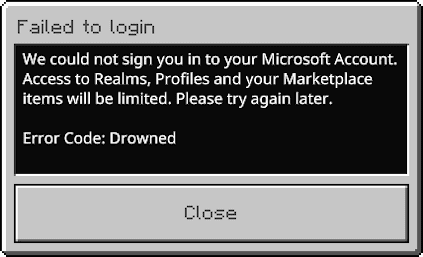
Here’s the error message players see when Bedrock Edition can’t complete sign-in. It doesn’t say much: your account failed to sign in, online features are limited, and no fix is suggested on-screen. That’s exactly why searching for solutions afterward becomes necessary.
The fixes below start with Mojang’s own current guidance, then cover the additional troubleshooting steps that have helped players before that guidance existed.
How to Fix “Error Code: Drowned”

Mojang’s support team maintains a dedicated troubleshooting page for “Error Code: Drowned,” and it lays out four steps in this order:
- Reset your Microsoft account sign-in in Minecraft.
- Update to the latest version of Minecraft.
- Check the platform status page for Xbox, PlayStation, Nintendo, Apple, or Google Play to confirm the issue isn’t on Microsoft’s end.
- Change your Microsoft account password.
If step three turns up an active outage, there’s nothing left to do but wait for Microsoft to restore the account servers, the same situation that took Minecraft offline for many players during the July 2024 incident described above.
Additional Things to Try
If Mojang’s four steps don’t clear the error, these community-tested options are worth trying too:
- Restart your console or computer, then relaunch Minecraft.
- Clear the account sign-in data stored in your Minecraft profile.
- Reboot the Xbox Live Auth Manager, Game Save, and Networking service on Windows.
- Confirm your DNS settings and network connection are working correctly.
- Contact Xbox or Microsoft support directly if none of the above resolves the error.
Minecraft Account Issues
Microsoft-account sign-in errors take several different forms on Bedrock Edition, and “Error Code: Drowned” is only one of them. Failed to Verify Username points to a different account-verification failure, and Minecraft Multiplayer is Disabled usually traces back to privacy or family settings rather than a broken sign-in. If you’re dealing with Drowned specifically, working through Mojang’s four official steps first, then the additional options above, resolves it for most players.