Vanilla Minecraft farming covers the basics: wheat, carrots, potatoes, and a furnace for cooking. It works, but it leaves most of the kitchen empty. Farmer’s Delight fills that gap with new crops, a full set of cooking stations, and improved soil that speeds up your farm. Whether you run a solo survival world or a multiplayer server with friends, setting up this mod takes only a few minutes. This guide walks through downloading Farmer’s Delight, installing it on both client and server, and covering everything the mod adds so you know what to expect when you load in.
The mod is available for Minecraft Forge, NeoForge (for 1.21+), and Fabric. The steps differ slightly depending on which loader you use. You can also find Farmer’s Delight on both Modrinth and CurseForge if you prefer either platform.
How to Download Farmer’s Delight
- Navigate to Forge or Fabric versions of Farmer’s Delight, then click Files.
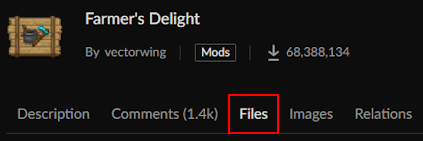
- Locate your desired Game Version and press the three vertical dots on the right.

- Proceed to click Download File, then save it on your desktop for later.
Repeat this process for the Fabric API if you’re using the Fabric version.
If you use NeoForge on Minecraft 1.21 or newer, search for Farmer’s Delight on CurseForge or Modrinth and filter by your game version. NeoForge builds are listed alongside Forge builds.
Client Installation
Before you can play with Farmer’s Delight on a singleplayer world or a client-side modded profile, you need Forge, NeoForge, or Fabric installed in your Minecraft launcher. Once the loader is set up, adding the mod is straightforward. The steps below cover getting the mod file into the right folder. If you need help setting up Forge on your client first, that guide covers the full process.
- Open your Minecraft launcher, then click the Folder icon for your modded profile.
- Locate the mods directory and move all downloaded files into this area.
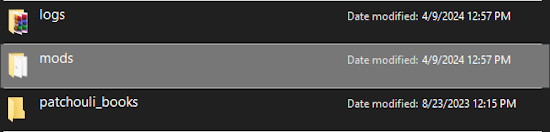
If you don’t have this folder, create it before adding the files inside.
- Return to the launcher, then click Play on your modded profile to load it up.
Server Setup
To play Farmer’s Delight with friends on your own Minecraft server, purchase a server if you haven’t already. Then change the Game File on your panel to Forge, NeoForge, or Fabric, matching whichever loader version you downloaded. After that, follow the steps below to get the mod files onto your server. For reference on installing Fabric on your server, the full walkthrough is available separately.
- Head towards your Apex server panel, then click FTP File Access near the top.
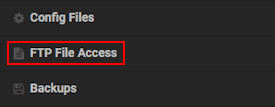
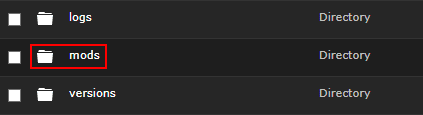
- Login with your credentials and enter the mods directory from the list.
- Continue to click Upload, then drag and drop the files accordingly.
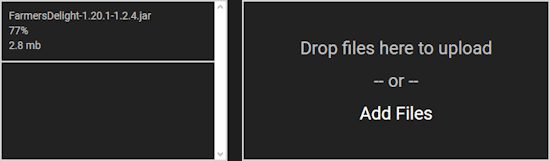
- Wait for these files to reach 100%, then generate a new world from the main panel.
- Once that’s completed, join the server to confirm everything works.
Modbox Installation
You can install Farmer’s Delight on your server using Modbox, our built-in mod browser with direct CurseForge integration.
- Log in to your Apex Hosting account and open your Minecraft server panel.
- On the left side, select
Server Configuration > Modbox.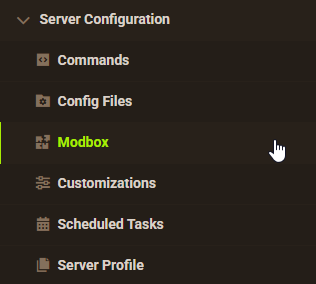
- Search for the mod you want and open its mod page.

- Select the recommended version for your server, then click
Install.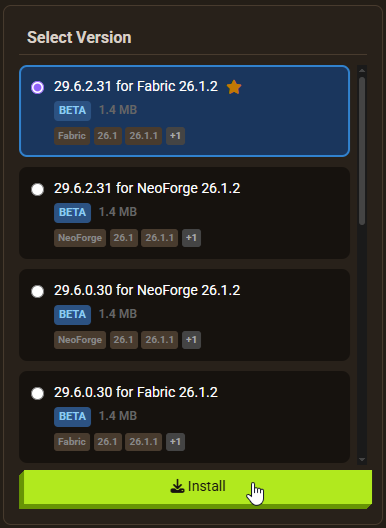
Note: Modbox automatically matches mods to your server's installed version, but does not install dependencies automatically. For more details on using Modbox, check out our full Modbox guide.
Farmer’s Delight has no required dependencies on Forge or NeoForge. Fabric users need Fabric API installed as well — search for and install it individually through Modbox using the steps above, before installing Farmer’s Delight itself.
Farmer’s Delight Features

Farmer’s Delight adds a cooking system that goes well beyond the furnace. You get new crops to grow, new soil to cultivate, dedicated cooking stations with their own UI, and a knife tool for getting more out of raw ingredients. The sections below cover each major addition so you know what to expect and how to use it.
Organic Compost
When you explore villages, you may find a block that looks different from standard soil. That is organic compost, one of the two new soil types the mod introduces. You can find organic compost in the world or craft it yourself using organic materials: rotten flesh, bone meal, dirt, and similar items all count as valid inputs. Organic compost is the starting point for upgrading your farm, but it is not the finished product on its own.

Rich Soil

Placing organic compost next to a water source converts it into rich soil over time. The process takes around 10 minutes on average and cannot be accelerated. Watch for the block texture to shift, which signals the conversion is underway. Rich soil is the farming surface for the new crops the mod adds, including tomatoes, cabbage, onions, and rice. Growing these on rich soil gives you ingredients for the cooking recipes further in the mod.
Improved Farming
Farmer’s Delight adds crops that do not exist in vanilla Minecraft. Tomatoes, cabbage, onions, and rice each have their own growth stages and can be found growing wild in the world, in villages, or in shipwreck chests. Once you have seeds or plants, grow them on rich soil for the best results. These ingredients combine with vanilla food items to produce new cooked dishes at the cooking stations below.

Cooking Pot


The cooking pot sits over a fire source and accepts ingredient items through its UI. Add bowls to the pot along with your ingredients to produce stews and soups. Recipes include vegetable soup, mushroom stew, and other combinations using the new crops. Each serving consumes one bowl, so keep a good supply on hand. The cooking pot is the primary way to produce high-saturation food in the mod, making it worth setting up early in a playthrough.
Stove Cooking


The stove works with a skillet for cooking individual food items and small dishes. A cutting board and knife expand your options further: use a knife on the cutting board to break down raw ingredients into portions, getting more items per input than you would from a crafting table. The stove supports recipes like bacon and eggs, steak and potatoes, honey glazed ham, and stuffed pumpkin. Mixing proteins with the new crops produces most of the high-saturation dishes available through stove cooking.
Farmer’s Delight Minecraft Server
Running Farmer’s Delight on a shared server with friends opens up cooperative farming, communal kitchens, and large-scale food production. The mod’s additional blocks, including knives, cutting boards, cabinets, and food crates, give players more to build and organize. For more ideas on installing mods on a Minecraft server, including tips for managing mod compatibility, that guide covers the full process. You can also explore other popular Minecraft mods that pair well with Farmer’s Delight for a more complete modded experience.
FAQ
Farmer’s Delight supports Minecraft Forge from 1.15.2 to 1.20.1. For Minecraft 1.21.1 and newer, NeoForge builds are available (version 1.3.2, released May 2026). The Fabric version, distributed as Farmer’s Delight Refabricated, supports Minecraft 1.16.5 through 1.21.x. Always check the mod’s CurseForge or Modrinth page to confirm the latest release for your game version.
The Forge and NeoForge versions have no additional dependencies. The Fabric version requires the Fabric API to run correctly. Download the matching Fabric API version for your game version and place it in the mods folder alongside Farmer’s Delight.
New crops and organic compost only appear in newly generated chunks. If you started the world before installing the mod, you need to either generate a new world or travel far enough from your current position to load chunks the mod has not yet touched.
Yes. NeoForge builds of Farmer’s Delight are available for Minecraft 1.21.1 and newer. Download the NeoForge version from CurseForge or Modrinth, filtering by game version and NeoForge loader.