


Apex Hosting beefed up its security!
Keeping your account and server safe is a top priority for us, so we’ve upgraded. This new update will recognize trusted devices, challenge suspicious activity, and send security alerts, while also providing you control over any active session. In other words, you can ensure no one unauthorized can access your account or server. Let’s breakdown what this new security update looks like for you 👏
How the System Works
The system operates automatically in the background to guard your account.
- Trusted Devices: Browsers used to login successfully are remembered. Recognized devices and known IP addresses pass without prompts.
- Verification Challenges: Logins from unfamiliar devices and IP addresses trigger a six digit email verification code requirement.
- Instant Alerts: Successful logins on new devices generate an email notification detailing the device, IP address, and time.
- Session Management: Users can view all active logins and end sessions remotely. Users with Google Authenticator bypass email challenges entirely.
The Verification Experience
Suspicious logins redirect users to a verification page displaying a masked email address and a code entry field. Key rules for verification codes:
- Codes remain valid for 10 minutes.
- Users receive five entry attempts before the login attempt cancels.
- Up to five code resends are allowed per challenge, with a 60 second delay between requests.
- Password or security updates during a challenge invalidate outstanding codes immediately.
Managing Active Sessions
Self service session control is available inside your panel profile under Profile and then Active Sessions. This page allows you to inspect active connections, view last recorded IP addresses, and monitor login times. You can terminate individual sessions using the Log Out button or disconnect all other devices at once. If an unrecognized device appears, end that session and change your password immediately to prevent reentry. For emergency account recovery or login assistance, our Support Team remains available 24 hours a day.
How to Access Active Sessions
- Login with your Apex Hosting panel account.
- Navigate to your
Profile(⚙️) at the top right. - Near the top left, click
Active Sessions.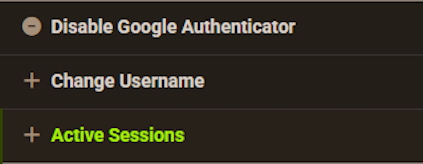
- Control any of your sessions from this page.
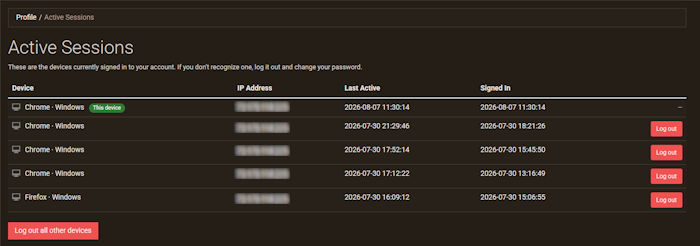
You cannot remove your own session, only other ones.
Enhanced Security
With this new update for your Apex Hosting account, you’re in control over sessions and trusted devices. Whether you’re managing your server on a computer, mobile device, or anything else – this system will ensure you remain safe. This helps when you’re traveling and using public networks to connect to the internet, as you might want to revoke access later on when you return home.






















