

Everyone is online, Discord is buzzing, and the moment your friend hits Join, Palworld throws up a failed to join screen instead of your world. Palworld multiplayer not working is one of the most common headaches for server owners, and it rarely means anything is actually broken. Most of the time, one setting or one wrong digit is standing between your group and game night, not a real server failure.
Before changing anything, run through this quick triage. It clears up the majority of “Palworld can’t join server” reports in a couple of minutes:
| Symptom | Likely Cause | Where to Look |
|---|---|---|
| “Failed to join” or a timeout | Server is offline or crashed | Server Overview status |
| A friend on Xbox or PS5 cannot see your server | Crossplay is off, or their platform is not allowed | Customizations + Game Settings |
| Server is missing from the Community Servers list | Community Server setting is off, or the name is too generic | Customizations, Startup Flags |
| “Incompatible version” error | Server has not updated since the last patch | Restart to update |
| Prompted for a password, or kicked immediately | A password is set, or the server is at its player cap | Customizations + Server Overview |
Work through the matching section below, or read straight down if you are not sure which applies. If you have never connected to this server before, our guide on how to join a Palworld server covers the basic IP and community-search steps. This one is about why those connections fail. And if the trouble is save corruption, a stuck startup, or a gameplay bug rather than a failed connection, Palworld server common issues is the better stop.
Is Your Palworld Server Actually Online?
Check the status indicator on the Server Overview screen in your Apex panel before anything else. If it reads anything other than Online, that alone explains every failed join; no address or setting matters while the server itself is down.
Click Restart, wait for the status to flip back, then have everyone try again.
A crash usually leaves a trail. Scroll down to Connected Players. If it shows no one online and the status has been stuck for a while, the server likely stopped responding instead of shutting down cleanly, and Restart clears most of those hangs. But if Restart doesn’t bring it back within a few minutes, or it keeps crashing right after startup, a recent file or settings change is the more likely culprit, and that calls for Force Stop followed by a fresh Start rather than repeated restarts.
Double-Check the IP Address and Port
Palworld’s default game port is 8211 over UDP, but Apex assigns each server its own dedicated port, so yours is very likely not 8211. The exact address your friends need is printed live on the Server Overview screen, under IP Address:Port. Copy it fresh each time instead of reusing an old message in Discord.
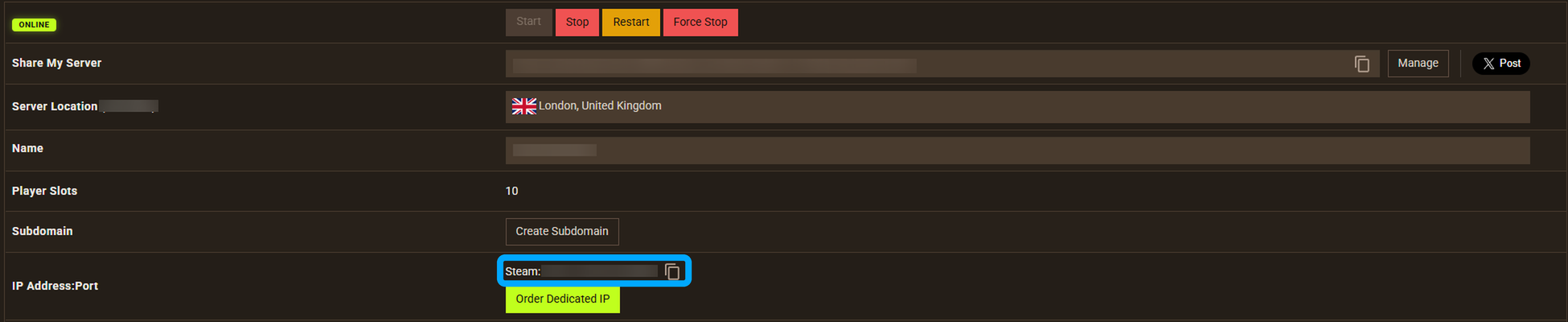
A single missing digit after the colon is one of the most common reasons a direct connection fails outright. In Palworld, choose Join Multiplayer Game, paste the address and port exactly as the panel shows them, and confirm before connecting. If the server was recently restarted with a new configuration or moved to a different plan, the port can change, so treat the panel as the source of truth over anything written down last week.
Crossplay and Platform Mismatches
If a friend on a different platform cannot connect, Palworld cross platform not working almost always traces back to the Cross Play toggle in Customizations, under Server Settings, or to the Allowed Platforms list inside the full Palworld Game Settings editor. Since the version 0.5.0 update, Steam, Xbox, PlayStation 5, and Mac players can all share one world, but only if the host has switched it on.

Only the server owner controls this. Joining players don’t need to change anything on their side. Turn Cross Play on, restart the server to apply it, and confirm every platform your group uses is still listed under Allowed Platforms rather than trimmed out. Pocketpair’s own server configuration documentation lists the default as every supported platform, so if one console keeps failing while others connect fine, that platform has probably been removed from the list rather than blocked outright. One separate wrinkle worth knowing: Xbox players need an active Xbox Game Pass Core membership to use online multiplayer at all, regardless of anything your server controls.
Why Your Server Is Not Showing Up in the Community List
Palworld server not showing up in the in-game Community Servers browser almost always comes down to the Palworld Community Server Setting toggle, under Startup Flags in Customizations. Turn it on and restart. This Startup Flag is Apex’s switch for what Palworld itself calls the -publiclobby launch option, exactly as Pocketpair’s own community server setup guide describes, and it’s separate from whether the server is password-protected.
Console players cannot type an IP address directly, so the Community Servers browser and search are their only way in. This setting matters far more for Xbox and PS5 groups than for PC. Once it is on, set a distinctive Public Server Name under Server Settings; generic names return so many results they bury yours. Have your console friends select Community Servers from the multiplayer menu and search that exact name instead of scrolling. Palworld’s community browser can be inconsistent about refreshing its list, so if a name search comes up empty on the first try, wait a few minutes and search again before assuming the setting did not take.
Version Mismatches After an Update
When Palworld ships a client update, Steam, Xbox, and PlayStation download it automatically, but your Apex server only updates when it restarts. Playing on mismatched versions produces an incompatible version error the moment someone tries to join, and it has nothing to do with your address, password, or crossplay settings.
Apex servers update automatically by default, applied the next time the server restarts, unless Disable Auto Updates is switched on under Customizations, in the Other section. If you deliberately keep updates disabled, for example to protect a mod setup, you’ll need to update the server files manually before the version gap closes. Our 24/7 Support Team can confirm exactly how far behind a server has fallen. Double-check your own client too. A console or Steam client can lag behind if its own auto-update setting has been turned off.
Passwords, Full Servers, and Other Connection Gates
Two simpler causes trip people up constantly: a Server Password set under Customizations that the joining player has not entered, and a server sitting at its Player Slots limit. Palworld’s supported maximum is 32 players, though your own Player Slots value on Server Overview could be set lower.
If a password is set, tick Enter Password on the direct-connect screen before typing it in. Leaving that box unchecked is a common reason a correct password still gets rejected. Our guide to setting a password for your Palworld server covers that flow in full. One thing worth stating plainly for anyone moving over from self-hosting: on Apex’s managed hosting, you never forward ports or touch your home router for friends to connect. That’s strictly a self-hosted concern, since your server already sits on a public address the moment it’s running.
Still Can’t Connect?
If you have worked through status, address, crossplay, community visibility, version, and password, and the connection is still failing, something less common is happening: a corrupted world file, a broken recent settings change, or an issue on Palworld’s own backend. Our 24/7 Support Team can check server logs directly and rule out anything happening below the panel. Every Palworld server hosting plan includes that support as standard, so open a ticket rather than guessing further.
Frequently Asked Questions
Why Does Palworld Say Failed to Join Server?
Most often the server is offline, the address or port is wrong, or the client and server are on different versions after an update. Check the status on Server Overview first, then confirm the IP Address:Port matches exactly what the panel shows right now.
Why Can’t My Friends Join My Palworld Server?
Work through platform and password gates before assuming something is broken: crossplay disabled or their platform missing from Allowed Platforms, a password they have not entered, or a server already at its player cap. Each of these blocks a join without the server itself being down.
Does Palworld Have Crossplay Between PC, Xbox, and PS5?
Yes. Since the version 0.5.0 update, Steam, Xbox, PlayStation 5, and Mac players can share the same dedicated server, controlled entirely by the host through the Cross Play and Allowed Platforms settings.
Why Is My Palworld Server Not Showing Up in the Community List?
The Palworld Community Server Setting under Startup Flags needs to be turned on, since that is what registers the server with the public lobby list console and PC players search from. A generic Public Server Name can also bury it under a stack of similar results.






















