Once you’ve beaten the Ender Dragon and kitted out your character, regular Minecraft can start to feel too comfortable. Hardcore mode removes that safety net: one death ends the world permanently, difficulty is locked to Hard, and you cannot respawn. Both Java Edition and Bedrock Edition support hardcore natively, so you can set it up in minutes whether you play solo or with friends on a Minecraft server.
What Is Hardcore Mode in Minecraft

Hardcore mode changes two things. First, the difficulty is permanently locked to Hard, which means hostile mobs deal more damage, skeletons and other ranged enemies are more accurate, and hunger drains faster. Second, death is final. When your health hits zero, Minecraft switches you to Spectator mode and locks you out of the world. You cannot respawn or switch back to Survival.
Your hearts display differently in hardcore worlds, appearing as red with a skull icon so you always know you are in a permanent-death world. Every decision carries real weight, from engaging a creeper at close range to bridging over lava.
Setting Up a Hardcore World
Hardcore world creation works slightly differently between Java and Bedrock. Both platforms now support it natively. If you want to convert an existing world instead of starting fresh, you would need to edit the NBT files directly, which carries a risk of corrupting progress, so starting a new world is the recommended approach.
How to Create a Hardcore World in Java Edition
Java Edition has had native hardcore support for years. Creating a hardcore world takes about 30 seconds from the main menu.
- Launch Minecraft and select Singleplayer from the main menu.
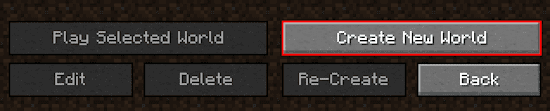
- Click the Create New World button in the bottom left corner.
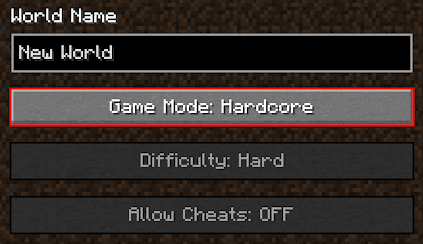
- Change the Game Mode option to “Hardcore” at the top of the creation screen.
- Customize any other settings, then click Create New World at the bottom to begin.
If you want to push the challenge further, the world creation screen also lets you adjust game rules such as fire spread, mob griefing, and natural regeneration before generating the world. These settings carry over into your hardcore save.
How to Create a Hardcore World in Bedrock Edition
Bedrock Edition added native hardcore mode in the Bundles of Bravery update (version 1.21.40, October 2024). No behavior packs are required.
- Open Minecraft and go to the Play tab.
- Select Create New, then choose Create New World.
- In the Game Mode dropdown, select “Hardcore.”
- Adjust world settings as needed, then tap Create to generate the world.
Difficulty is locked to Hard automatically once you select Hardcore. You cannot change it after creation.
If you are running an older version of Bedrock that predates 1.21.40, you can still use a behavior pack as a workaround. The setup process for that is covered in the guide on how to install behavior packs on a Bedrock server.
Running a Hardcore Minecraft Server

Playing hardcore with friends multiplies the stakes considerably. When one player dies, they are moved to Spectator mode while everyone else continues. Apex Hosting makes it straightforward to get a dedicated hardcore server running.
After purchasing a server from the Apex Hosting pricing page, navigate to Config Files > Server Settings in your panel and enable the “Hardcore mode” option. You can also set the server difficulty to Hard from the same area if it is not already locked by the hardcore setting.
Apex Hosting also offers a pre-configured dedicated hardcore server setup that includes custom gameplay changes for players who want an even more punishing experience.
Frequently Asked Questions
Can I turn off hardcore mode after creating the world?
Not through normal gameplay. Once a world is created in hardcore mode, the setting is written into the world data. Changing it requires editing the level.dat NBT file, which carries a risk of corruption.
Does dying on a hardcore server delete the server world?
No. On a multiplayer server, individual players are moved to Spectator mode on death. The world itself stays intact for other players.
Is hardcore mode available on all platforms in Bedrock Edition?
Yes. As of Minecraft Bedrock 1.21.40 (October 2024), hardcore mode is available across all Bedrock platforms including Windows, console, and mobile.