


The Origins mod for Fabric gives each player a unique identity from the moment they spawn. Instead of adding new items or biomes, it changes how your character interacts with the world: a Merling breathes underwater but suffocates on land, a Blazeborn is immune to fire but spawns in the Nether, and an Elytrian can launch into the sky every 30 seconds. This guide covers how to install Origins on your server and client, explains all nine default origins, and includes survival tips for the two most difficult starts.
What Is the Origins Mod
Origins is a Fabric mod created by Apace100, available for Minecraft 1.16 and later versions. When a player joins a server with Origins installed, they are prompted to choose one of nine origins before entering the world. Each origin comes with a set of passive abilities and drawbacks that remain active for the entire playthrough.
The mod is designed to be extensible. Community-made origin packs are fully compatible with the base mod and appear alongside the default nine in the selection screen. All origin abilities and drawbacks are configurable through data packs.
Server Installation
- Log into your Apex server panel and select your server.
- Scroll to the JAR File section and search for Fabric. Select it and restart the server to load the Fabric files.
- Download the Origins mod and the Fabric API mod from CurseForge. Make sure both files match your server’s Minecraft version.
- Stop your server and click FTP File Access in the left-hand menu.
- Log into FTP and open the mods folder.
- Click Upload in the top-left corner and drag both
.jarfiles into the upload window. - Once both files reach 100%, return to the main panel and start your server.
Client Installation
Every player who joins the server also needs Fabric and the mods installed locally.
Install Fabric:
- Go to the Fabric installer page and download the universal installer.
- Open the installer, make sure Client is selected, and choose the Minecraft version that matches your server.
- Check Create Profile, then click Install.
Add the mods:
- Open the Minecraft launcher and click Installations at the top.
- Find your Fabric profile and click the folder icon on the right to open the profile directory.
- If a mods folder does not already exist, create one with that exact name.
- Copy your Fabric API and Origins
.jarfiles into the mods folder. - Launch Minecraft to load the mods.
Modbox Installation
As an alternative to the manual installation, you can install Origins on your server using Modbox, our built-in mod browser with direct CurseForge integration.
- Log in to your Apex Hosting account and open your Minecraft server panel.
- On the left side, select
Server Configuration > Modbox.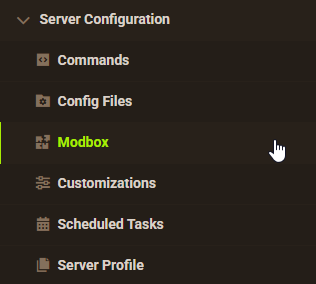
- Search for the mod you want and open its mod page.

- Select the recommended version for your server, then click
Install.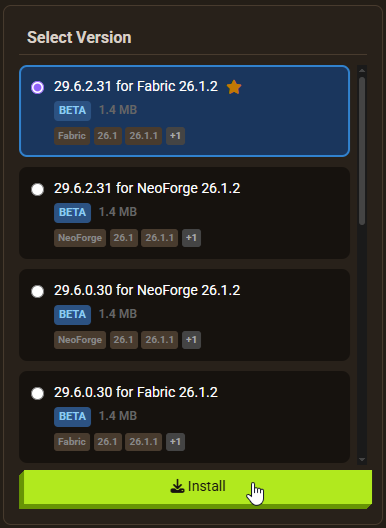
Note: Modbox automatically matches mods to your server's installed version, but does not install dependencies automatically. For more details on using Modbox, check out our full Modbox guide.
Origins requires the Fabric API dependency mod to function. Search for and install it individually through Modbox using the steps above, before installing Origins itself.
The Nine Origins
The default Origins mod includes nine origins. Each has a set of passive bonuses and drawbacks.
Enderian

- Can teleport with Ender Pearls without carrying any
- Extended reach
- Takes damage on contact with water
- Afraid of Pumpkins
Merling

- Breathes underwater indefinitely
- Full underwater vision
- Mines blocks underwater at normal speed
- Increased swim speed
- Does not sink
- Can only hold breath for a short time out of water
Phantom

(Toggle between phantom and solid state)
- Passes through solid blocks in Phantom State
- Invisible in Phantom State
- Loses hunger over time in Phantom State
- Burns in daylight when not in Phantom State
- 3 fewer hearts
Elytrian

- Natural Elytra wings
- Can launch into the air every 30 seconds
- Deals double damage while in Elytra flight
- Can only wear light armor (Chainmail or below)
- Takes extra kinetic damage from falls and collisions
- Weakness and Slowness in low-ceiling environments
Blazeborn

- Immune to fire and lava
- Deals more damage while on fire
- Immune to poison and hunger
- Spawns in the Nether
- Takes damage on contact with water
Avian

- Permanent Slow Falling
- Slightly faster movement
- Must sleep at high altitude
- Cannot eat meat
Arachnid

- Can climb walls
- Slows enemies with cobweb on hit
- 3 fewer hearts
- Can only eat meat
Shulk

- 9 extra inventory slots that do not drop on death
- Natural armor
- Can break stone blocks without a pickaxe
- Cannot use shields
- Exhausts faster
Feline

- No fall damage
- Higher jumps while sprinting
- Slight night vision
- Scares Creepers away
- Can only mine natural stone when there are at most 2 adjacent natural stone blocks
- 1 fewer heart
Surviving the Hardest Origins
Most origins have manageable drawbacks. Two stand out as significantly more difficult in the early game: Blazeborn and Merling.
Blazeborn Survival Tips
The Blazeborn spawns in the Nether with no starting equipment. The fire immunity and combat bonuses are strong, but reaching the Overworld requires effort.
The first priority is finding a Warped Forest biome. No hostile mobs spawn in Warped Forests, making it the safest starting point in the Nether. Harvest the giant fungi for wood-equivalent materials and hunt Hoglins for food.
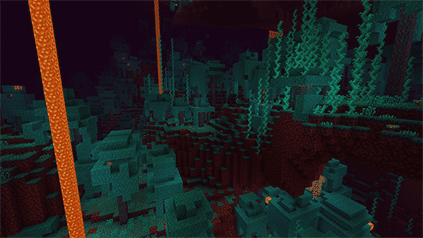
To reach the Overworld, look for a Ruined Portal. These spawn naturally throughout the Nether and can be repaired into a working Nether Portal. Gather Flint from Gravel for the fire starter. Obsidian can be obtained by bartering with Piglins or found in naturally generated chests near the portal.

Once the portal is complete, travel to the Overworld and continue a normal Minecraft run from there.
Merling Survival Tips
The Merling breathes underwater indefinitely but has a limited breath bar on land. The ocean has more resources than it did before 1.13, and underwater ravines contain all standard ores.

The key mechanic to use is rain. While it is raining, the Merling can remain on land without losing breath. Use rain periods to gather things that cannot be obtained underwater: Ender Pearls, seeds, meat, and any other surface resources. Carry water buckets as insurance for extended land trips.
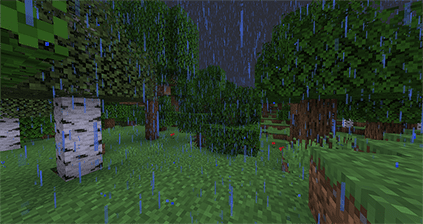
The Merling works best in a group where other players can cover surface-based tasks.
Custom Origins and Community Add-Ons
All nine default origins are fully configurable through data packs. Players and server owners can adjust or remove any ability or drawback from any origin.
The Origins mod also supports community-made origin packs. These are downloaded separately and added to the mods folder alongside the base mod. Compatible packs appear in the origin selection screen alongside the default nine.
The mod creator, Apace100, has also released Origins: Classes, a companion mod that adds a second layer of selection on top of origins. Classes provide additional abilities without drawbacks. The benefits are intentionally modest; playing without Classes first is recommended to learn each origin’s baseline feel.

Common Origins Mod Issues
The most common causes are a duplicate mod file, a missing dependency, or a mismatched mod version. Check the Origins CurseForge page for the full list of required dependencies and verify all mod files match the server’s Minecraft version.
A duplicate mod shows up in the console as a “Duplicate Mods” error with the mod name listed below it. Go to FTP File Access, open the mods folder, and delete the extra copy.
The console will display a message such as “requires mod [mod name] to be available.” Download and add the missing mod to the mods folder to resolve it.
If the server hangs on startup after adding or removing mods, check the console for configuration prompts or mismatched mod IDs. Verify all installed mods are compatible with the same Minecraft and Fabric API version.
Conclusion
The Origins mod changes how Minecraft plays at a fundamental level by tying every session to the strengths and limits of a chosen origin. The nine default origins cover a range of playstyles from the underwater-focused Merling to the combat-oriented Blazeborn. Setting up the mod on an Apex Fabric server takes only a few minutes, and with community-made origin packs and the Origins: Classes add-on, the mod scales well for servers looking to add variety beyond the defaults.






















