

Running mods on a Minecraft server requires the right modloader. Fabric is one of the most popular options for Minecraft Java Edition, with a large library of mods covering everything from new creatures and dimensions to quality-of-life improvements. Getting Fabric running on your Apex server takes just a few clicks through the panel, with no file transfers or manual installs needed. This guide walks you through both the standard setup and custom loader options, plus a list of mods worth trying once your server is ready.
What Is Fabric?
Fabric is a lightweight, open-source mod loader for Minecraft Java Edition. It sits between the game and your mods, letting modifications run on the server without altering the core game files. Most Fabric mods also require Fabric API, a shared library that handles common mod functions, installed alongside them in the mods folder. Fabric supports the current Minecraft release and is updated quickly when new versions launch, making it a reliable choice for keeping a modded server current.
Setting Up Your Fabric Server

You can set up Fabric in two ways: using the latest supported Minecraft version, or pinning a specific version if your mods require it. The sections below cover both methods. Before you begin, make sure you have an active server on your Apex account. You should also install Fabric on your Minecraft client so it matches your server’s modloader.
Setting Up a Fabric Server
- Head towards your Apex server panel, then locate the Game File section.
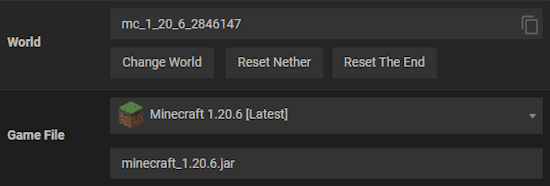
- Proceed to click on the currently selected option and type “Fabric” in the search bar.
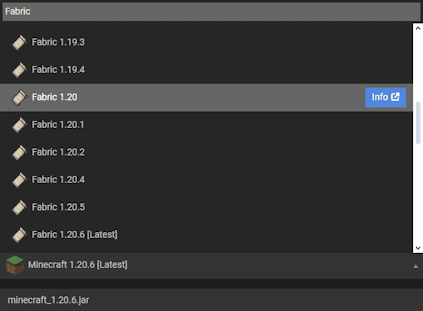
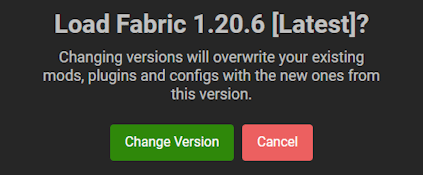
- Choose your desired game version, then press on it and confirm the changes.
- Make sure to Restart the server so Fabric will generate its required files to run.
Once the server restarts, Fabric is active. You can now add mods by uploading .jar files to the mods folder via the File Manager, or by using the Mods section in your panel. Every mod you add must target the same Minecraft version as your server. If you need help with the next step, see our guide on how to add mods to your Minecraft server.
Custom Fabric Loaders
If a specific Fabric mod requires an older or non-standard loader version, you can set that through the Customizations area. Keep in mind that using a loader version that your installed mods do not support can cause crashes, so check each mod’s requirements before changing this setting. For the vast majority of setups, the default loader version selected during the standard setup is correct.
If you need to install Fabric manually via FTP instead of through the panel, we have a separate guide for that.
- Navigate to the Customizations area from your main server panel.
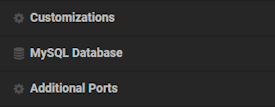
- Continue to enter your desired Fabric loader version accordingly.
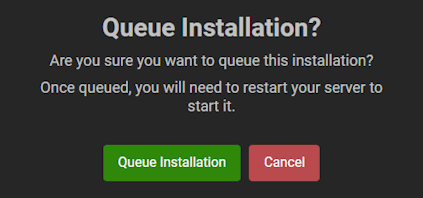
- Afterwards, click on it and queue the installation when prompted.
- Restart the server to begin using this new Fabric loader version!
To verify valid loader versions, check the Fabric Loader releases page on GitHub before entering a version number.
Popular Fabric Mods to Try

The Fabric mod loader has one of the most active modding communities in Minecraft, with thousands of mods available through Modrinth and CurseForge. The table below covers a range of popular starting points, from new creatures to dimension exploration to enchanting overhauls.
| Modification | Description |
|---|---|
| Artifacts | Discover unique items from lootable chests that have special powers |
| Critters and Companions | Encounter a wide variety of new land and aquatic creatures in-game |
| Easy Magic | Quality of life change for all enchantment tables, making it possible to reroll choices |
| Eden Ring | Embark on a grand journey in a new dimension in space, accessible via portals |
| Enchancement | Adds a whole lot of new enchantments and changes how players apply them |
When building a mod collection, check that all mods target the same Minecraft version. A single version mismatch is the most common reason a modded server fails to start. A good approach is to test your full mod list in the Fabric client before uploading to the server. If you want help finding Fabric mods for your server, we have a guide covering the main mod platforms and how to filter by loader type.
Common Issues
In some cases the server crashes after switching to Fabric via the Game File section. This usually happens when existing mods are incompatible with the selected Minecraft version, or when required dependencies are missing. Creating a new server profile gives you a clean installation to test against. If the cause is unclear, our Support Team can help identify the problem.
If the custom loader version you set is not taking effect, double-check that the version number you entered is valid. You can confirm the correct values on the Fabric Loader releases page. If the server still does not load correctly after using a valid version, the issue is likely mod incompatibility, as some mods require specific loader versions and will fail on others.
Most mod problems come down to two causes: incompatibility or missing dependencies. Make sure you have installed Fabric API in your mods folder, as most mods require it to function. Check each mod’s description page for listed dependencies, as some mods need several. If you have done all of this and mods still do not work, confirm that Fabric is successfully installed on the server by checking the server console on startup for the Fabric version line.






















