When you die in Minecraft, every item in your inventory drops on the ground and despawns after five minutes. The keepInventory gamerule stops that from happening, letting you keep inventory on in Minecraft so nothing is lost on death. This guide covers how to enable it on both Java and Bedrock editions, for singleplayer worlds and multiplayer servers.
Benefits of Keep Inventory

The most obvious benefit is keeping your items, but the gamerule does more than that. With keep inventory active, your experience points stay with you when you die as well, so you never lose the enchanting levels you have built up. Players also use it to reset hunger by dying deliberately, since a fresh spawn restores the hunger bar. These benefits make the gamerule useful for both casual survival and Minecraft server administration.
Keep Inventory Setup

The keepInventory gamerule is available in both Java and Bedrock editions. The steps differ slightly depending on whether you are playing singleplayer or on a server. Operator permissions or cheats are required in all cases. The sections below cover each combination separately.
Note for Java Edition 1.21.11 and later: Minecraft 1.21.11 (released December 2025) renamed all gamerules to a new minecraft:rule_name format. The gamerule is now referenced as minecraft:keep_inventory. On servers running 1.21.11 or newer, use /gamerule minecraft:keep_inventory true. The older /gamerule keepInventory true syntax may no longer be accepted. If you are on an older version, continue using the camelCase format.
Java Edition
Java Edition requires cheats to be enabled before you can run gamerule commands. On an existing singleplayer world without cheats, you can temporarily open it to LAN and enable cheats from that menu. You can also use NBTEditor to modify the level data directly for a permanent solution.
Java Singleplayer
- Open Minecraft and select your world from the main menu.

- Make sure cheats are enabled before proceeding.
- Open the chat and run
/gamerule keepInventory true(or/gamerule minecraft:keep_inventory trueon 1.21.11+).
- A confirmation message appears in chat if the command worked.
Java Multiplayer
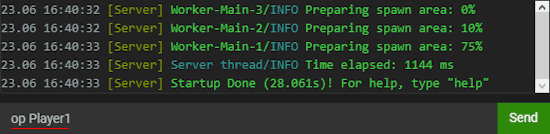
- Log in to your Apex server panel and grant yourself operator status if you do not already have it.
- Join your server with your Minecraft account and open the chat.
- Run
/gamerule keepInventory trueto enable the feature.
- A confirmation message appears in chat. Run
/save-allafterward to write the change to disk.
Bedrock Edition
Bedrock Edition handles keep inventory differently in singleplayer versus servers. In singleplayer, a toggle in the Settings menu activates it directly. Server setup requires enabling cheats through the panel first.
Bedrock Singleplayer
- Launch Minecraft and open your world, then go to the Settings menu.
- Under the Game category, scroll down and turn on Activate Cheats.

- In the same area, enable the Keep Inventory option.

- You will keep all items when you die from this point on.
Bedrock Multiplayer
- Open your Apex server panel and click Config Files in the top-left menu.

- Select Bedrock Server Settings and set Allow Cheats to Enabled.

- Click Save, then Restart Now when prompted.
- Join your server as an operator.
- Open the chat and run
/gamerule keepInventory true.
- A confirmation message in chat means the change applied successfully.
Common Issues
Unable to Use Gamerule Commands
Gamerule commands require either cheats enabled or operator status. On a server, run op [username] from the server console to grant yourself operator permissions. On Bedrock servers, also set Allow Cheats to Enabled in the Bedrock Server Settings and restart the server. On Java singleplayer worlds created without cheats, open the world to LAN from the pause menu and enable cheats there. Note that this only lasts for the current session. For a permanent fix, use NBTEditor to modify the world’s level data.
Still Losing Items After Enabling Keep Inventory
If keep inventory appears active but you still lose items on death, run /save-all on Java to force the world to write the change. A server restart on Bedrock can also help if changes are not sticking. You can check whether the gamerule is active by running /gamerule keepInventory with no value, which returns the current setting. If you need to recover items that were already lost, the Apex panel backup restore tool can roll back your world. For items dropped before keep inventory was active, teleporting back to your death coordinates may let you reach them before they despawn.
Conclusion

The keepInventory gamerule gives you full control over whether death costs you your items and experience. It works across both editions and can be toggled on or off at any time without restarting your world. If you want to explore what other gamerules can do, the guide on how to change tick speed covers another commonly adjusted setting. You can also set a world border to keep players within a defined area alongside other world customization options like this one.
Useful Links
- How to Enable Cheats in Minecraft
- Becoming a Minecraft Server Operator
- How to Install and Use NBTEditor
- Minecraft Gamerule Command List
- Minecraft Server Hosting
Frequently Asked Questions About Keep Inventory in Minecraft
How Do I Turn On Keep Inventory in Minecraft?
Run /gamerule keepInventory true in the chat. Cheats must be enabled in singleplayer, or you need operator status on a server. On Java Edition 1.21.11 and later, use /gamerule minecraft:keep_inventory true instead.
What Does Keep Inventory Do in Minecraft?
It stops your items and experience points from dropping when you die. Everything stays in your inventory exactly as it was.
Why Is My Keep Inventory Command Not Working?
The two most common causes are cheats being disabled and not having operator permissions. Check that cheats are on in your world settings or that you have OP status on the server, then try again. On Bedrock servers, also confirm that Allow Cheats is set to Enabled in the server settings.
How Do You Enable Keep Inventory on a Minecraft Server?
Run op yourUsername from the server console, then join and enter /gamerule keepInventory true in chat. Follow up with /save-all to make sure the change is saved.
Can You Use Keep Inventory in Minecraft Bedrock Edition?
Yes. In singleplayer, toggle it on directly in the Game Settings menu. For servers, enable Allow Cheats in the panel, restart, then run the command in-game as an operator.
Why Did I Still Lose Items After Enabling Keep Inventory?
Confirm the command ran without errors and that cheats were active when you ran it. On servers, run /save-all or restart the server. You can verify the gamerule is active by typing /gamerule keepInventory with no argument.