Running a mob farm, a crop farm, or an automatic smelter in Minecraft comes with one frustrating limitation: the machine stops working the moment you walk away. Minecraft only keeps the area around you actively simulated, which means any farm or redstone device in an unloaded chunk goes idle until a player returns. A chunk loader solves this by keeping specific regions loaded at all times, even when no players are nearby. This works in vanilla Minecraft servers, modded servers, and singleplayer worlds alike.
This guide covers how a chunk loader works, how to build one using vanilla redstone and Nether portals, and what mod or plugin options exist if you want a simpler solution.
What Is a Chunk Loader

A chunk loader keeps designated regions of your world in an active state continuously, regardless of where any player is located. This applies across dimensions, so a chunk loader can keep a farm running in the Overworld while you explore the Nether, or keep an end farm ticking while you are in your base.
The active zone matters for mob farming. Only the 3×3 chunk area centered on the player processes entities at full speed, which means positioning your chunk loader correctly is important for maximizing farm efficiency. Press F3 + G to display chunk borders in-game, which helps you identify where chunk boundaries fall so you can place your machine in the right spot. For more on managing loaded areas, see the guide on how to reload chunks in Minecraft.
How to Make a Chunk Loader
Before starting this process, you’ll need some required resources. These include 10x Obsidian, 14x Building Blocks, 2x Comparator, 2x Redstone Dust, 4x Dropper, 2x Observer, 2x Hopper, 1x Flint & Steel, and 2x Levers. Make sure to gather these supplies in your Minecraft world. If you’re having trouble collecting them, consider enabling cheats or becoming a server operator to easily obtain all required materials.

Afterward, follow the instructions below to build the chunk loader machine in your world.
- Locate your desired spot for the chunk loader, then break 2 blocks on the ground.
- Build a portal, then place 1 Dropper facing up and another one towards the portal.

- Connect 1 Hopper to the first dropper, then place a Comparator behind the dropper.
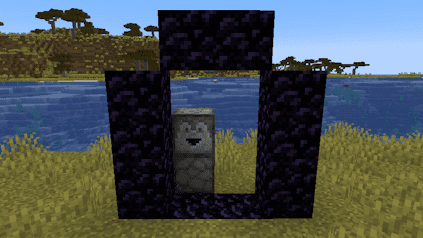
- Proceed to place a block behind the comparator, then use Redstone Dust on top of it.
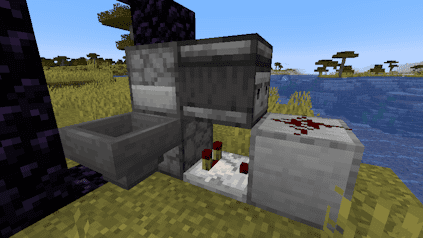
- Afterward, set the Observer looking at the redstone so it functions properly.
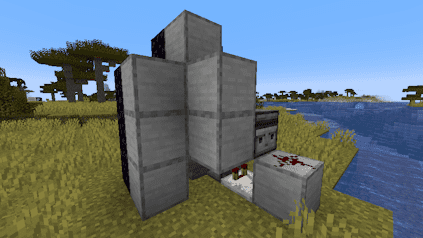
- Continue to cover up the hopper with building blocks, so items drop correctly.
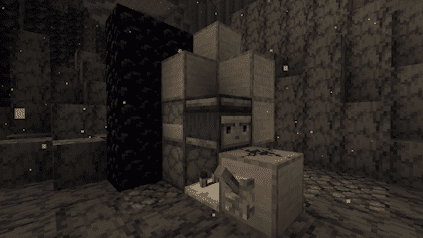
- Ignite the portal frame, enter the Nether dimension, and verify it’s where you want it.
- Once you’re ready, build the same machine for the second portal.
Note: Levers can be used to stop/start the machine, placed near the redstone dust.
- If successful, items will cross dimensions into the droppers to load chunks.
The machine works by looping an item between a Nether portal pair. Every time an item passes through the portal, it extends the chunk load timer. Keeping this loop running means both sides stay active indefinitely. As of Minecraft 1.21.5, chunk loaders no longer require a manual restart after the world is reloaded, so the machine picks up automatically when the server or singleplayer session resumes.
Chunk Loader Mods and Plugins

If you prefer not to build the redstone contraption, mods and plugins offer a simpler path. The Chunk Loaders mod on CurseForge is one of the most downloaded options and supports Forge, NeoForge (1.21 and newer), and Fabric across a wide range of Minecraft versions. It works by placing a single block in-game, which keeps the surrounding area loaded without any redstone setup. You can also explore the Chunky plugin for pre-generating and managing loaded regions on a server.
For plugin-based servers running Spigot or Paper, ChunkLoader on Spigot gives administrators control over which chunks stay loaded through commands and a configuration menu, without requiring players to build anything in-world.
Common Issues
My Chunk Loader Isn’t Working
Having the Nether portal within two chunks of the chunk boundary will prevent the machine from functioning. View chunk borders using F3 + G and position the portal so it sits in the center of the chunk, not near the edge. Apply this check in both the Overworld and the Nether. If borders are correct, double-check that each Observer, Dropper, Comparator, and Hopper is placed in the right direction and position. If the item dropping into the Nether is not being picked up, swap the positions of the Hopper and Dropper on that side. The item needs to complete a continuous loop for the machine to keep chunks loaded.
The Server Is Lagging
Active chunk loaders consume server resources because they force the game to simulate areas that would otherwise be idle. Running too many of them at once is the most common cause of performance drops tied to this setup. Stopping some machines or limiting the total number of active loaders on the server resolves most cases. Keeping two or three loaders active is a reasonable ceiling for most servers without causing noticeable impact.
Mods or Plugins Don’t Work
If the Chunk Loaders mod or a server plugin is not working, start by confirming the mod loader version matches the mod file. For example, a NeoForge 1.21.1 build of Chunk Loaders requires NeoForge to be selected as your game file on the server panel. Fabric mods require the Fabric loader and Fabric API with matching versions. Plugins require Spigot or Paper rather than a Forge or Fabric server. If you need to obtain the chunk loader block or run setup commands, you or the server owner may need operator permissions first.
Conclusion
Chunk loaders let your farms, smelters, and redstone machines keep running while you explore elsewhere. The vanilla redstone design requires some initial setup and precise chunk positioning, but once it runs, it needs no maintenance. If the build feels too involved, the Chunk Loaders mod and plugin alternatives get you to the same result with far less setup time. Start with one or two loaders, confirm the performance impact is acceptable on your hardware, and expand from there.