


Overview
When playing through Minecraft for a long time, players tend to hone their skills in various fields. Whether it is redstone, building, or PvP, these skills can be fun to build up, but many do get to experience true rewards for their efforts. This is rectified with Aurelium Skills, a Minecraft plugin that adds a level progression system for simply playing survival. Earn increasingly powerful abilities, power up your stats, and much more. Additionally, a new mana system allows you to activate special abilities like felling tall trees and dealing increased damage. Adding plugins to your server is streamlined with our Apex Hosting panel, so we have created this tutorial to help you get started.
Modbox Installation
IMPORTANT: Make sure to have Spigot or Paper selected in the Game File option on your server panel so plugins can work properly.
- Head towards your Apex server panel for the server.
- Navigate to
Server Configuration > Modboxon the left.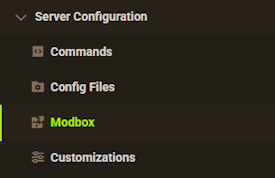
- Choose the version and search for the plugin you want, then select it.
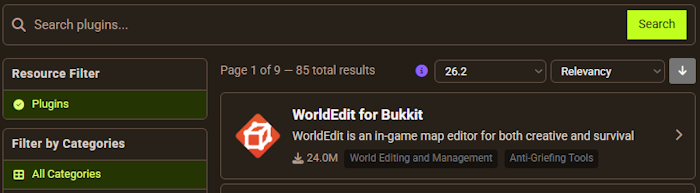
- Click
Installon the left and wait for it to be installed. - Restart the server to load the plugin. Repeat this process for any other plugins.
Manual Installation
Download Aurelium Skills on Bukkit or Spigot and follow these steps:
- Download the plugin file from the link above.
- Head towards your Apex server panel for the server.
- Locate the Game File option, then select Spigot or Paper if you haven't already.
- Navigate to
File Management > FTP File Accessand login. - Drag + drop the .jar file in the
pluginsdirectory. Alternative: Click theUploadbutton and select the file. - Wait for this to finish, then return to the main panel.
- Restart the server and the plugin should load properly once you join.
How to Get Started

Once you first log into your server, you should immediately notice two new pieces of info added above your hotbar. The first is your health, which will match your normal health bar. The second is your Mana, which is used to activate special skills once unlocked.
Leveling Skills

As you perform various tasks, you will see a bar at the top of your screen counting your exp for different stats. These may be for foraging, farming, archery, and more.
Each task is leveled through an applicable action. Foraging levels up by cutting down trees, agility by sustaining fall damage, and other similar actions.

Each time a skill is fully leveled up, you will receive an on-screen prompt and a message in your chat with details of the new level. This will include stat rewards, ability unlocks, and more. It will be worthwhile to check this message for each new level to stay notified about your progress.
Skills Menu
To keep track of all of your important information, you can use the /skill command from in-game to open up the skills menu. This menu will allow you to click icons to see information on the different skills and level progression for your character. Hover over an icon for more information or click on one to check your current progress.

Level Progression

Inside of the progression menu, you can check the stained glass to view your current level (green), next level (yellow), and all of your future levels (red). By hovering over a level, you can see the rewards and ability upgrades. Alternatively, you can use the icons near the top to see your unlocked abilities, server ranking, XP sources, and ability details.
Abilities

As mentioned previously, every skill has a set of abilities that can be unlocked and leveled up through continuous use. Most of these are passive buffs that will affect players automatically. Oftentimes these include improved drops, increased XP gain, extra damage, and more. Each category of skill has a different set of abilities, so consider checking them ahead of time to stay informed.
Mana Abilities

The other subset of unlocks are Mana Abilities, which are player-activated and require mana to use. These are often single-use or have a short timer before a cooldown period is activated. Some will allow you to fell trees instantly, increase your attack speed, and plenty of others. These are usually unlocked at level 7 for compatible skills.
Stats

As you continuously level up, you may notice various additional stats being upgraded, such as Strength or Toughness. These stats will buff your character as they are increased, giving an additional reason to build up your skill levels.
| Stat | Description |
|---|---|
| Strength | Increases your attack damage when using various weapons. |
| Health | Increases the amount of total health your character has. |
| Regeneration | Increases the recovery speed of both health and mana. |
| Luck | Increases the chance of getting rare loot from mobs, fishing, etc. |
| Wisdom | Increases your maximum mana, experience gain, and decreases anvil costs. |
| Toughness | Increases your damage resistance to enemy attacks. |
Common Issues
Nothing from the plugin is working:
If you are not earning any skill levels or the commands do not exist, try to use the /plugins command from in-game and check the results. If Aurelium Skills is not listed, verify that the .jar file was uploaded directly into the plugins folder, otherwise it will not be detected by the server. Once this is done, restart the server and try again.
I cannot use any commands:
If you receive a permissions error when trying to use /skills and similar commands, you may need to configure a permissions plugin like LuckPerms. This is not normally required, however you can view all up-to-date permissions found on the Aurelium Skills wiki page here. Once done, restart or reload the server as needed and try to use the commands once again.
Helpful Links
Aurelium Skills Spigot Page
How to Add Plugins to your Minecraft Server
Aurelium Skills Wiki Page






















