Your inventory fills up halfway through a mining trip, and the nearest chest is 200 blocks behind you. Sophisticated Backpacks fixes that with a backpack you wear, upgrade and fill without leaving the cave. This guide covers the backpack tiers, the upgrades worth crafting first, and how to put the mod on your Apex server so every player can use it.
What Sophisticated Backpacks Adds to Your Server
Sophisticated Backpacks adds a backpack that players wear in the chest slot or place in the world like a block. It comes in six tiers, from Leather to Netherite. Each tier adds storage slots and upgrade slots.
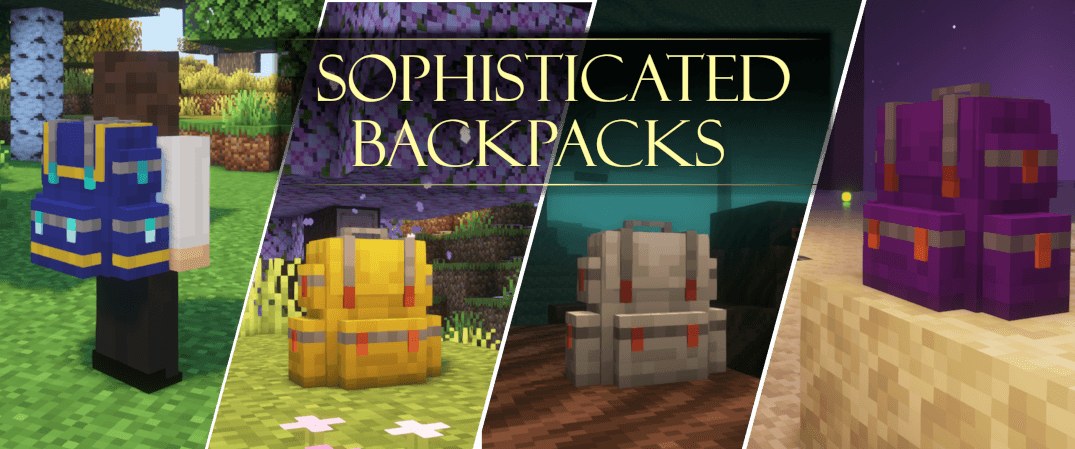
Image by P3pp3rF1y via CurseForge
Players open a worn backpack with the Open Backpack key, which is B by default, or by right-clicking it in hand. A placed backpack works like any container, and hoppers and pipes can insert or extract items. Dye gives each backpack a main color and an accent color: dyes placed left of the backpack in the crafting grid set the main color, and dyes placed right of it set the accent. Your group can tell packs apart at a glance.
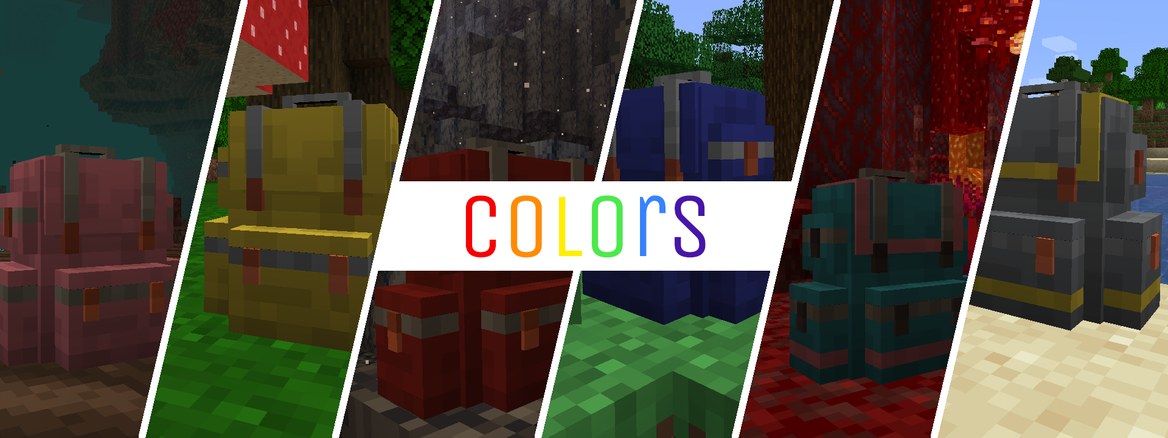
Image by P3pp3rF1y via CurseForge
Both sides need the mod. Sophisticated Backpacks on Modrinth lists it as required on the client and the server. It also needs a second mod, Sophisticated Core, which the next sections cover.
Backpack Tiers at a Glance
The slot counts below are the defaults in the mod’s source configuration. Each tier after Leather is an upgrade of a lower-tier backpack.
| Tier | How You Get It | Storage Slots | Upgrade Slots |
|---|---|---|---|
| Leather | Craft with leather, string and a wooden chest | 27 | 1 |
| Copper | Upgrade a Leather backpack with copper ingots | 45 | 1 |
| Iron | Upgrade a Leather or Copper backpack with iron ingots | 54 | 2 |
| Gold | Upgrade an Iron backpack with gold ingots | 81 | 3 |
| Diamond | Upgrade a Gold backpack with diamonds | 108 | 5 |
| Netherite | Smithing table: Diamond backpack and netherite ingot, plus a netherite upgrade template on 1.20 and later | 120 | 7 |
Copper isn’t in every version. The 1.16.5 builds skip it and go straight from Leather to Iron.
But the jump that matters most is Iron. It doubles your upgrade slots from one to two, and that’s where a backpack stops being a bigger bag and starts doing jobs for you.
Upgrades Worth Crafting First
Upgrades go into the backpack’s upgrade slots. A Leather or Copper backpack has just one, so choose the one that matches how you play. These seven cover most servers:
- Pickup Upgrade: sends items you would normally pick up straight into the backpack, based on a filter you set.
- Magnet Upgrade: pulls dropped items into the backpack when they fall within range, again with a filter.
- Feeding Upgrade: feeds you from the food in the backpack when you get hungry, and a filter controls which foods it uses.
- Stack Upgrade: multiplies how many items fit in each slot, with versions from 1.5x (Starter) to 16x (Tier 4). An Omega version raises the limit to its maximum possible value.
- Restock Upgrade: moves filtered items from a chest or barrel into your backpack when you shift-right-click it with the pack in hand.
- Crafting Upgrade: adds a crafting grid to the backpack that keeps its items when you close it.
- Void Upgrade: destroys items that match its filter, so check the filter before you trust it with your diamonds.
Stack Upgrades multiply with each other. Two 4x upgrades give a 16x stack size, which is why a Netherite backpack with Stack Upgrades holds far more than its 120 slots suggest.
Most of these also come in an Advanced version with more filter slots and filtering by mod or tag. The Everlasting Upgrade is worth a late slot on a Netherite pack, because it protects the backpack from explosions, lava, fire and cactus. Start with Pickup or Magnet. Everything else is a refinement.
Which Version and Modloader You Need
The mod ships for two modloaders, and which one you need depends on your Minecraft version. According to Modrinth, there’s no official Fabric build.
| Modloader | Minecraft Versions |
|---|---|
| Forge | 1.16.5, 1.18.2, 1.19.2, 1.20.1 |
| NeoForge | 1.20.1, 1.21, 1.21.1, 1.21.4, 1.21.5, 1.21.8, 1.21.10, 1.21.11, 26.1, 26.1.1, 26.1.2, 26.2, 26.3 |
On Minecraft 1.21 and later, the mod needs NeoForge. The setup steps below use Forge, so they apply to Minecraft 1.20.1 and earlier.
Sophisticated Core is a required dependency, and it’s a separate download. Grab the Core file for the same Minecraft version and modloader as the backpack file.
How to Add Sophisticated Backpacks to Your Apex Server
You can install the mod through Modbox or upload the files yourself. Our guide to adding mods to a Minecraft server covers the general process if you want more background. Either way, the server must run Forge first.
Set Your Server to Forge
- Head towards your Apex server panel and stop the server.
- Scroll down to the
Game Filesection and open the dropdown. - Type “Forge” and pick the Forge version that matches your mod files.
- Choose “
Change Version“, then “I'll Restart Later“.
Our Forge setup guide has the full walkthrough if you want it.
Install With Modbox
Modbox is the mod browser built into the panel, and it’s the quicker route.
- Log in and open your Minecraft server panel.
- On the left, select
Server Configuration > Modbox. - Search for “Sophisticated Backpacks” and open its mod page.
- Select the version you want and click “
Install“. Modbox recommends the version that matches your installed server version. - Search for “Sophisticated Core” and confirm it’s installed too. If it isn’t, install it the same way.
Open Server Configuration > Modbox > Manage Installed to see every mod on the server. Then start the server from the main panel to load the mods. When a new release comes out, the “Update All” button in the same screen refreshes everything at once, and your players then need the matching update.
Upload the Files With FTP
Download the Sophisticated Backpacks and Sophisticated Core files for your Minecraft version, then work through these steps. If you haven’t used the panel’s file tool before, see how to connect via FTP.
- Click “
FTP File Access” near the top left of the panel. - Log in with your password.
- Open the
modsfolder. - Drag and drop both
.jarfiles into it. - Restart the server from the main panel.
Getting Players Connected: Match Every Version
Every player needs Sophisticated Backpacks and Sophisticated Core on their own client. Give them the same file versions the server runs, on the same Minecraft version and the same modloader.
If you play through the CurseForge app, our CurseForge server guide notes that any mod on the server must also be installed on your launcher. The same rule applies to other launchers.
After you run Update All in Modbox, tell your players to update too. And do it before anyone tries to join.
Sophisticated Storage: The Companion Mod
Sophisticated Storage comes from the same developer and builds on the same Core. It adds tiered barrels, chests and shulker boxes with upgrade slots of their own, and the barrels and chests come in every vanilla wood variant.
The two mods work together. Sophisticated Storage adds a Decoration Table, and the backpack mod can use it to apply colors to a backpack. Storage also has Limited Barrels, which have just one to four slots but allow far larger stacks.
It’s required on both client and server, like the backpack mod. Forge builds cover 1.18.2, 1.19.2 and 1.20.1; NeoForge builds start at 1.20.1 and run through the 1.21 line and beyond. So with Core already installed, Storage adds just one more file.
Common Issues
A missing dependency is the first thing to rule out when a modded server misbehaves. Work through these before you dig deeper.
Check that Sophisticated Core is installed. The backpack mod needs it, so the server can’t load one without the other. Match the Core file to your Minecraft version and modloader.
Compare the player’s mod files with the server’s. Any difference in Minecraft version, modloader or mod version is the first thing to check. Give the player the same files.
There’s no official Fabric build. Run Forge on Minecraft 1.20.1 or earlier, or NeoForge on 1.21 and later, and use the file built for that modloader.
If you’ve checked all three and the server still won’t start, our Support Team can take a look.
Sophisticated Backpacks FAQ
Yes. The mod is required on both the client and the server, and Sophisticated Core is required as well.
There’s no official Fabric build. The mod runs on Forge up to Minecraft 1.20.1 and on NeoForge for 1.20.1 and later.
By default, a Netherite backpack has 120 storage slots and 7 upgrade slots.