Are you ready to completely transform your Minecraft gameplay without spending hours fighting with complicated file uploads and confusing server configurations? Modding your custom world should be an exhilarating experience that unlocks new adventures, rather than a tedious puzzle that leaves you staring at error screens.
In this Apex Hosting guide, we are going to show you an incredibly simple way to install Minecraft mods directly from your server panel. We have developed a lightning-fast system that handles all the heavy lifting, allowing you to jump straight into the action!
What is Modbox?
Modbox is our built-in control panel feature crafted specifically to maximize your comfort and accessibility when managing your server. We have stripped away all the complex barriers of traditional server customization so you can focus your energy on actually playing the game. By centralizing all your necessary tools into one sleek interface, this feature completely eliminates the headache of manual file setups and puts total control right at your fingertips.
How to Install Minecraft Mods
Injecting fresh, exciting content into your multiplayer world has literally never been this effortless. Our robust new tool comes equipped with a highly intuitive mod browser that features direct CurseForge integration right out of the box. You can immediately search through thousands of amazing community creations and instantly inject them into your server with a simple one-click installation process.
- Log in to your Apex Hosting account and open your Minecraft server panel.
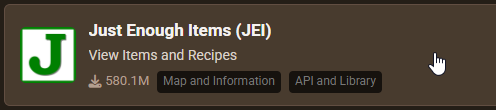
- On the left side, select Server Configuration > Modbox.
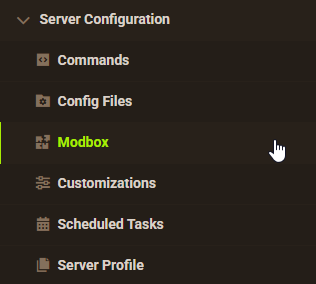
- Search for any mod you want and open its mod page.
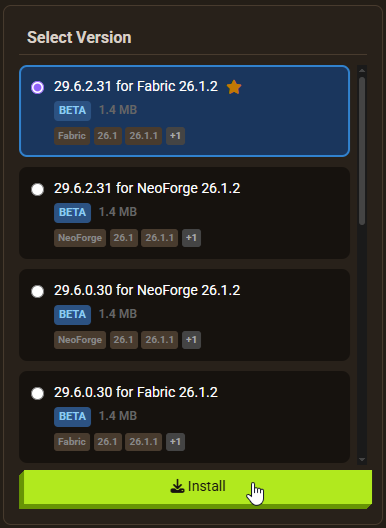
- Select the mod version you want (Modbox recommends you the optimal mod version based on your installed server version) and click Install.
Smart Version Matching
You can finally say a permanent goodbye to those frustrating compatibility errors and unexpected server crashes that ruin game night. Modbox works tirelessly behind the scenes to automatically detect your currently active server version the moment you open the browser. It then intelligently filters the database to only recommend the exact mods and specific file versions that perfectly match your current setup, ensuring absolute stability.
Managing and Updating Mods
Maintaining a highly customized server ecosystem shouldn’t feel like a demanding, full-time technical job. With our upgraded interface, you can effortlessly update your installed mods directly from the dashboard without ever needing to track down new files across the internet.
- Navigate to Server Configuration > Modbox > Manage Installed to instantly view every active mod on your server.
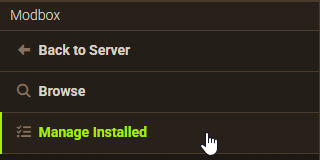
- From there, you can hand-pick specific files to patch manually, or just hit Update All to refresh everything simultaneously!
Alternative Management via FTP
Do you prefer taking a hands-on approach and directly manipulating your server files yourself? You can still utilize our fully optimized FTP File Access panel as a powerful alternative method.
⚠️ Always create a complete backup of your server files before making any massive directory changes!
👇 Review our dedicated guides on how to connect via FTP and how to add mods manually to maintain a clean folder structure.
Start Your Next Modded Adventure
Crafting the ultimate multiplayer experience is now significantly faster, surprisingly easier, and infinitely more comfortable than ever before. Log into your Apex Server Hosting panel right now to unlock the full potential of Modbox and revolutionize how you manage your community. Gather your friends, explore a seemingly endless library of incredible community content, and start building your dream world today! 👏