Vanilla villages have their place, but many players find the default villagers too limited for a rich survival experience. Minecraft Comes Alive Reborn changes that completely. MCA Reborn is a Forge, Fabric, and NeoForge mod that replaces standard villagers with human NPCs you can interact with, befriend, marry, and build a family alongside. With over 12 million downloads on CurseForge and active support through Minecraft 1.21, it remains one of the most popular social mods available. If you run a Minecraft server and want to make villages feel alive, this guide walks you through every step.
Mod Overview
MCA Reborn is a continuation of the original Minecraft Comes Alive mod created by WildBamaBoy. The Reborn fork has been actively developed since 2021 and is currently owned by jahx_senpoopie, with authorship credits including CDAGaming_, Luke100000 (Conczin), and soytutta. As of April 2026, the latest release is version 7.7.7 for NeoForge 1.21.1, with parallel releases for Fabric and Forge on 1.20.1 and earlier. The mod supports Forge, Fabric, NeoForge, and Quilt.
At its core, MCA Reborn gives each NPC a name, personality, mood, and set of genetics. You can talk, trade gifts, form relationships, get married, and raise children. A village management system lets you expand settlements and climb a rank ladder to unlock new controls over your community.
Mod Download
The mod is available on both CurseForge and Modrinth. The steps below use CurseForge.
- Navigate to the MCA Reborn CurseForge page.
- Press the Files button at the top, then scroll down to view all downloads.

- Locate the version you wish to use, then press the Download icon to the right.

- Save the file to a safe location, as it will be needed shortly.
- Additionally, download the matching version of Architectury API for Forge or Fabric.
Client-Side Installation
Before proceeding, install either Forge or Fabric on your launcher. If you are unsure which to use, our Forge vs Fabric comparison can help you decide. For Fabric installs, download the matching version of Fabric API as well.
- Open your Minecraft launcher, then press Installations at the top.
- Hover over your modded profile, then press the Open Folder icon to the right.

- In the new window, locate and enter the mods folder.
- Paste your necessary mod files for Minecraft Comes Alive Reborn here.

- Once done, return to the MC launcher and press Play on your modded profile.
Server-Side Installation
- Navigate to your Apex server panel, then stop the server.
- Scroll down to the Game File section and open the dropdown menu.
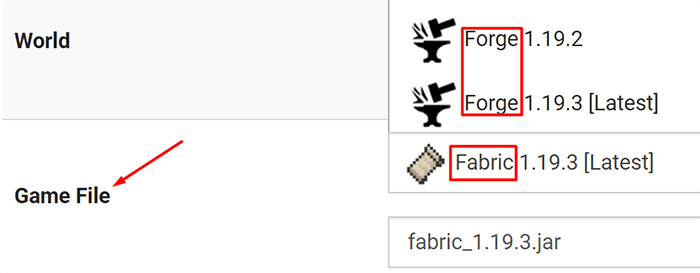
- Locate and select the Forge or Fabric version to match your mod files.
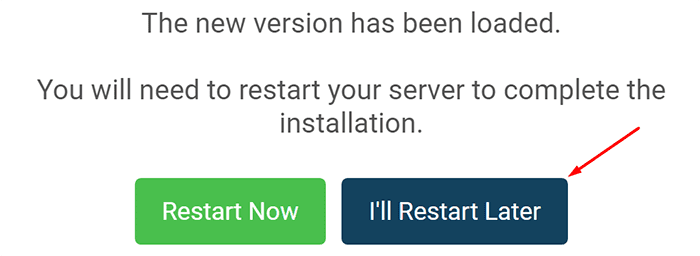
- Once done, we recommend creating a new world, then restart later.
- From the left-hand menu, click and log into the FTP File Access.
- Create and locate the mods folder, then enter it.
- Press Upload in the top-left, then drag + drop your mod files.
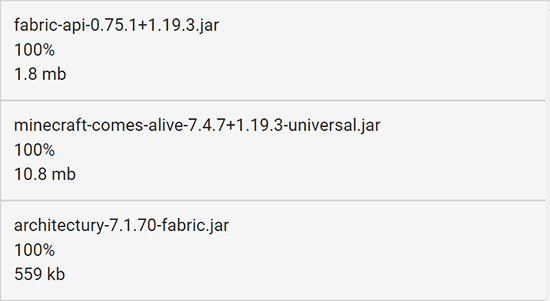
- When the uploads are at 100%, return to the main panel and restart the server.
The server will now start up with Minecraft Comes Alive Reborn, Architectury API, and Fabric API as needed. Once the server is marked as online, you can join using your modded client.
Modbox Installation
You can install Minecraft Comes Alive Reborn on your server using Modbox, our built-in mod browser with direct CurseForge integration.
- Log in to your Apex Hosting account and open your Minecraft server panel.
- On the left side, select
Server Configuration > Modbox.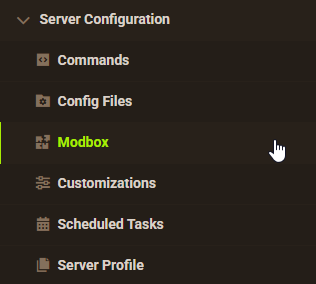
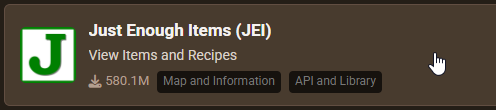
- Search for the mod you want and open its mod page.
- Select the recommended version for your server, then click
Install.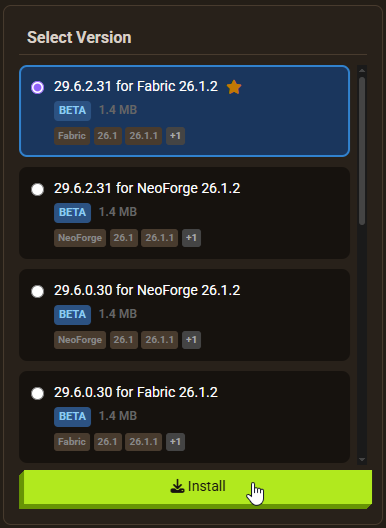
Note: Modbox automatically matches mods to your server's installed version, but does not install dependencies automatically. For more details on using Modbox, check out our full Modbox guide.
Minecraft Comes Alive Reborn requires the Architectury API dependency mod to function. Fabric users also need Fabric API installed. Search for and install each required dependency individually through Modbox using the steps above, before installing Minecraft Comes Alive Reborn itself.
Character Setup
When you connect for the first time, a Minecraft Comes Alive introduction screen appears. This lets you configure your character before entering the world.
Basic Information
On the first screen, you will be met with a few default options:
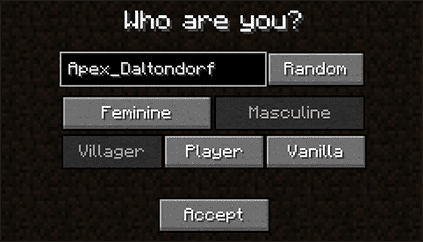
Name: The name that villagers will use when referring to you.
Feminine/Masculine: Your character’s build and body shape.
- Villager: Uses the villager model and all MCA options.
- Player: Uses your vanilla skin, but uses customizations for genetics.
- Vanilla: Uses vanilla skin and no genetics, but uses customizations for inheritance.
Style and Genetics
The second screen is where you shape your character’s appearance. You can adjust body proportions and skin tone, then dig into the Head menu to change facial features, eye style, hair color, and hairstyle. The Traits menu controls orientation and conditions such as color blindness. Depending on your choices on the previous screen, these genetics can carry over to any children you have in-game.

Spawn Location

The final screen lets you choose where you enter the world. Anywhere places you at a random location as in vanilla. Shipwreck attempts to spawn you near a shipwreck structure. The village options drop you directly into a specific village biome type, which is useful if you want to get started with NPC interactions straight away.
Introduction to NPCs
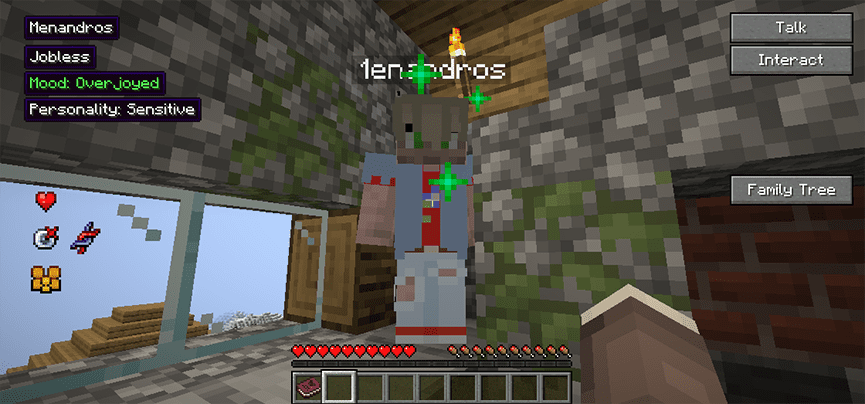
Once you find a village, the difference from vanilla is immediate. Every villager is a named human with a visible personality and mood. Right-clicking any NPC opens a full interaction menu.
Personalities and Info

The left side of the menu shows the NPC’s name, age, current mood, personality type, and any active traits. Hovering over personality or traits entries shows tooltips with more detail.
The bottom-left panel contains relationship tracking icons:

- Hearts: How much the NPC likes you. The higher the hearts, the friendlier they are.
- Analysis: Information on the previous interaction and chances of the next one being positive.
- Relationship: The relationship status of the NPC to you or other villagers.
- Genes: The specific genes that the villager has.
- Parents: Who the parents of the NPC are.
Talking and Interactions

The top-right of the menu holds the Talk and Interact buttons. Talk opens a list of conversation options including telling a joke, chatting, sharing a story, and various romantic topics. The NPC’s mood, personality, and current relationship level all affect how they respond, so pay attention to those indicators before picking a topic.
Interact gives you direct control options: having the NPC follow you, sending them to a location, equipping armor, or giving a gift. Gifts affect relationships, but the other commands do not.
Relationships
Positive conversations build hearts over time. Once a villager has enough hearts, they become a friend. From friendship you can progress toward a romantic relationship, but that requires specific items rather than just hearts alone.
Relationship: Once a villager is fond of you, gift them a Bouquet made from 5 flowers. If they accept, they become your partner.

Engagement: With enough hearts and time spent together, craft an engagement ring using 7 gold or rose gold ingots and 1 diamond. Give the ring to your partner and, if the conditions are right, you will become engaged.

Marriage: After spending more time together and reaching a higher heart threshold, craft a wedding ring from 8 gold or rose gold ingots. Gifting this successfully makes you officially married.


Note: Villagers develop their own relationships independently. Over time, NPCs may get married, have children, and become widowed without any input from you. If another villager gets there first, you can start fresh with someone new or use creative problem-solving with the game’s existing mechanics.
Children
When your heart level and relationship status are high enough, open the Talk menu and select the Procreate option. You will receive a swaddled baby that you carry in your hotbar. The baby must be held for 20 real-time minutes before you can place them down by right-clicking the ground.

Over the next 6 real-time hours, the child grows from a toddler to a full adult through several stages. Each stage unlocks different interactions, from assigning chores to simple conversation. As adults, your children may eventually form their own relationships and start families, extending your family tree further.
Village Management
The Blueprint item gives you tools to manage and expand your village. It works on player-built settlements as well as naturally generated villages. Craft one and right-click while holding it to open the management interface.
Adding Buildings


Stand inside a room or house, then press Add Room to register it on the village map. This lets NPCs claim housing and lets you see building data on the central map display. The Catalog tab lists special structures you can build, such as an armory or infirmary. Build the required blocks for a structure type, then add it as a room to unlock its effects.
Rising to Power

The Rank section shows your current village rank and the requirements for the next one. Requirements typically involve constructing Catalog buildings and reaching a combined heart total across all villagers. As your rank increases, you unlock new administrative controls over your settlement.
Setting Rules and Restrictions
Higher ranks unlock the Rules tab. Here you can set a tax percentage, a birth limit, and a marriage limit. Higher taxes bring more items to your storage but reduce your reputation with villagers. The birth and marriage limits give you control over population growth.

Common Issues
The game crashes on startup:
Verify that you downloaded Architectury API for the matching Minecraft version and that the game is running the correct mod loader. Fabric installs also require Fabric API. Once all dependencies are installed at matching versions, restart the client or server and try again.
I’m unable to join the server after installing the mod:
This is usually a client-side installation problem. Check the error message when joining, as it often points to the specific cause. Navigate to your mods folder and confirm the .jar files are present. Also confirm you are launching your Forge or Fabric profile, since launching the vanilla profile will not load any mods.
I can join the server but the mod isn’t working:
Most server-side issues relate to mod installation or an existing world. MCA Reborn attempts to convert vanilla villages to its format, but this does not always work on older worlds. Generating a new world is the most reliable fix. Go to the main panel page, press Change World, enter a new world name, and restart the server.
Helpful Links
Modded Minecraft Server Hosting
MCA Reborn CurseForge Page
How to Install Forge (Client-Side)
How to Install Fabric
Architectury API CurseForge Page