


Roguelike Adventures and Dungeons 2 (RAD2) is a Minecraft modpack focused on exploration and combat, adding custom dungeons, new biomes, a skill-based leveling system, upgraded villages, and enemies that grow stronger over time. This guide covers how to install the modpack on an Apex server, how to set it up on the client, and what to expect when getting started.
Server-Side Installation
- Navigate to the Apex server panel and stop the server.
- Scroll down to the Game File section and open the dropdown menu.
- Search for and select Roguelike Adventures and Dungeons 2.
- Follow the prompts to change the version, then generate a new world.
- When prompted, restart the server to load the modpack.
The first startup may take several minutes while the modpack files install and the world generates. Once the server shows as online, it is ready to join.
Client-Side Installation
Before proceeding, download and configure the CurseForge app for your operating system.
- From the CurseForge app, open the Browse Modpacks tab.
- Search for Roguelike Adventures in the search bar.
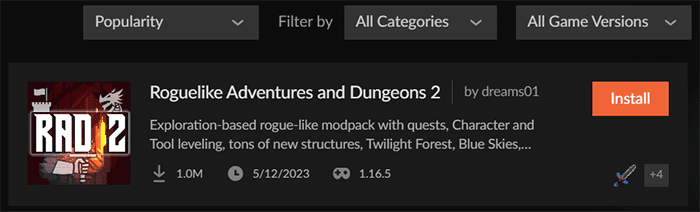
- Locate and select Roguelike Adventures and Dungeons 2.
- Press Install in the top right to begin the installation.
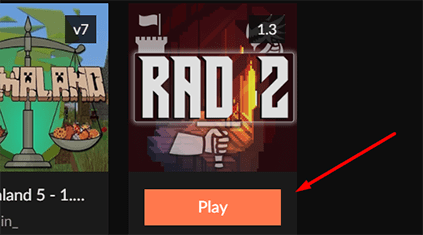
- Return to My Modpacks, then press Play once the installation is complete.
- Launch the game and join the server.
How to Get Started
On first spawn, the inventory includes starting gear: a sword, shield, food, armor, and two guide books. The minimap and stat display in the HUD are new additions from the modpack. The two books in the starting inventory are covered below.

Starting Inventory
Akashic Tome
Right-clicking the Akashic Tome while holding it converts it into any other guide book in the pack, including the Bestiary and Animal Dictionary. Left-clicking a block while holding it returns it to normal. This book is useful for looking up information about the many mods included in RAD2.
Quest Book
Right-clicking the Quest Book opens a quest screen with all available quests. The first page covers modpack-specific changes to dimensions, difficulty scaling, and more. Reading through and clicking the checkbox on each completed page grants rewards. Sub-sections of quests are accessible from the left-hand quest menu.


Leveling System
Moving, collecting items, and killing mobs all contribute to a leveling system that runs from the start. Each action type has its own skill track: running and jumping increase agility, combat increases combat stats, and so on. Building up these stats improves movement speed, damage output, and other attributes. Spending time on skills early makes later dungeons more manageable.

Adventuring the World
Villages in RAD2 are upgraded with new structures and villager types, including foresters and guards. Lampposts with directional signs appear throughout the world and often lead to villages or other structures. Exploring in the first day by following these signs is a reliable way to find loot and establish a starting point.
Upgraded Villages
Villages have been expanded with new building types and additional villager professions compared to vanilla Minecraft. Guard villagers defend the settlement, and new trade options are available from the extra professions. Villages are a good early base of operations.

Dangerous Dungeons
Throughout the world, dungeons and structures are populated with dangerous mobs guarding loot. Each dungeon is unique. The Foundry, for example, is a deep underground dungeon that grows more difficult the lower you descend, with blazes, skeletons, and magma cubes as common enemies.
Many overworld structures also contain boss fights. These bosses are upgraded versions of normal enemies with significantly increased health and damage output. Defeating them yields better rewards than standard mob drops.


New Biomes
RAD2 includes several new biomes alongside the standard Minecraft environment.
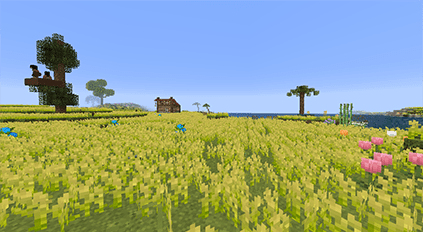
Blossoming Fields
A wide field filled with brightly colored flowers and cherry blossom trees. Open terrain makes it a practical location for building.

Rose Fields
A large field covered in roses. Visibility is lower than in open biomes, but building a base here provides a good defensive vantage point.

Seasonal Forests
An autumnal forest with red, orange, and yellow trees. The darker areas can lead to hostile mob spawns at night.

Prairie
A flat biome with abundant grass and water access. Good terrain for establishing a farm alongside a base.
Gameplay and Difficulty Scaling
After 3 in-game days, mobs begin gaining increased health and spawning with more equipment. The difficulty continues to scale with the number of players online. Progression events, including killing the Wither, entering the End, and killing the Ender Dragon, trigger further difficulty increases. These events also grant more experience points. Building up gear and skills before these milestones is recommended.

Common Issues
If joining fails, check for error messages in-game or in the server console for a more specific cause. The modpack must be installed and running on both the server and the client. If the launcher is not set to the RAD2 profile, the connection will be rejected. An “Incompatible FML modded server” warning can occasionally appear due to the number of mods in the pack, but the connection may still succeed if you proceed anyway.
If the server is crashing or stuck loading, check whether this is the first startup. The initial load can take several minutes while the world generates. If the server was set up without generating a new world, crashes may occur: verify a new world was created during setup. If mods were added or removed from the pack and the existing world needs to be kept, enter /fml confirm in the server console to force the server to start.
Conclusion
Roguelike Adventures and Dungeons 2 transforms a Minecraft server with dungeons, biomes, a leveling system, and scaling difficulty. Installing it on an Apex server takes only a few steps from the Game File panel, and the client setup uses the CurseForge app. For more on running modpack servers, see how to install CurseForge modpacks.
Helpful Links
Roguelike A-D 2 Curseforge Page
CurseForge App Download Page






















