

Have you ever wanted to host a Minecraft server that supports both plugins and mods? If so, then you can use ArcLight to do that – available for Fabric, Forge, and NeoForge. Whether you were already hosting a modded server or using Spigot/Paper, this new server type can help you support both mods and plugins. In this Apex Hosting guide, we’ll help you get started with ArcLight!
How to Install ArcLight
- Head towards your Apex server panel and press the stop button.
- Locate the
Game Filearea on your dashboard. - Click the currently selected option, then search for ArcLight.

- Choose the type you want, then follow the prompts.
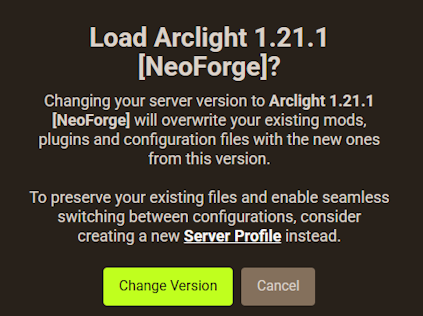
- When you’re finished, restart the server to load it.
⚠️ If you had any previously installed mods or plugins, we strongly recommend double-checking they are supported on the ArcLight version you selected. This includes the game version and modloader, e.g. NeoForge 1.21.1.
Mods & Plugins
Now that you’ve successfully installed ArcLight on your Minecraft server, you can now use mods and plugins together. You can quickly install them by using the FTP File Access area and uploading the files in the appropriate folders. Here are two guides that will help you do that:
Whether you want lots of mods or plugins, this server type enables you to do both. Keep in mind that some conflicts may occur depending on your setup. By default, mods and plugins aren’t compatible – so there could be errors or bugs. If you happen to run into problems, contact our Support Team to see if they can assist.
ArcLight Server Hosting
Setting up your own Minecraft server to support mods and plugins is easy with Apex Hosting. ArcLight is just one click away from being installed on your server. Choose the right version you want across Fabric, Forge, and NeoForge. Add plugins or mods to your server for a truly unique experience in Minecraft with friends!






















