
Setting up your own network in Minecraft is a great way to build a community, especially for those running minigames. One single server isn’t enough to run everything, so that’s why proxies are required (like Velocity or BungeeCord). They connect multiple servers together, while players only connect to one address. You can have minigames on one server, survival on another, and creative on the third server.
In this Apex Hosting guide, we will compare Velocity and BungeeCord to get you started. We’ll also be showing you how to set them up. Let’s begin 👏
Skip the hard work. Get the Plugin Installation Addon to allow us to set up your proxy.
What is a Proxy Server?
A proxy network acts as an intelligent traffic director between your players and your individual Minecraft instances. Instead of players directly connecting to an individual survival or creative world, they connect to the proxy server. This authenticates the player’s account with Mojang and seamlessly forwards their connection to a backend game server (typically a central Lobby or Hub).
Velocity vs BungeeCord
| Feature | Velocity | BungeeCord |
|---|---|---|
| Developer / Ecosystem | PaperMC (Modern API, Hangar) | SpigotMC (Classic Bungee API) |
| Performance | High throughput, optimized packet handling | Standard; can struggle under heavy connection spikes |
| Player Forwarding | Modern Forwarding (HMAC secret key authentication) | Legacy IP Forwarding (Requires manual IP whitelisting/firewalls) |
| Plugin Compatibility | Velocity-specific plugins only | BungeeCord-specific plugins only |
| Recommended Use Case | Modern networks (1.13+), Paper backends, high security | Legacy setups, pre-1.13 servers, legacy-only plugins |
Why Velocity?
Velocity is built from the ground up by PaperMC for modern versions of Minecraft. It replaces traditional IP forwarding with Modern Forwarding, where each packet between the proxy and backend is authenticated with a cryptographic secret. This prevents offline-mode UUID spoofing out of the box without needing complex network firewalls.
Why BungeeCord?
BungeeCord is the original, time-tested proxy created by SpigotMC. While older, it boasts a massive legacy plugin catalog. However, because backend servers must run in online-mode=false using standard IP forwarding, backends must be strictly protected with a firewall or plugins like BungeeGuard to prevent unauthorized direct logins.
How to Setup Velocity
- Head towards your Apex server panel and stop the server.
- Click the
Game Fileoption and search for Velocity. - Select it and follow the prompts accordingly – restart the server.

- Navigate to
File Management > FTP File Accesson the left.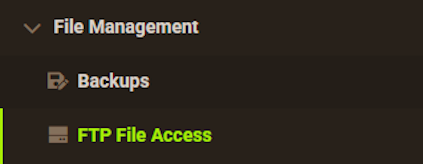
- Open the
velocity.tomlfile by double clicking it.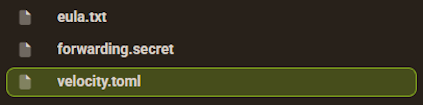
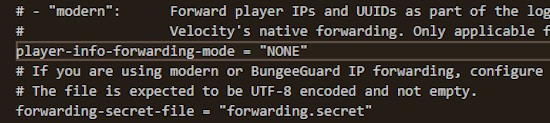
- Adjust the following settings:
bind: Set the port to match your proxy server’s assigned portplayer-info-forwarding-mode: Change this from “NONE” to “modern”.[servers]: Set your backend servers with their IP addresses.
forwarding.secret file and copy the string of values.
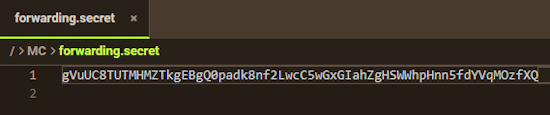
This is required for later!
Backend Server Setup
- Head towards your other backend server (such as the Lobby).
- Stop the server. Click
Server Configuration > Config Fileson the left.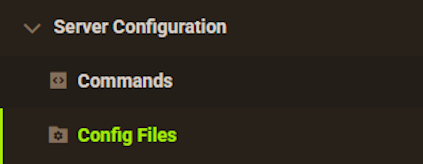
- Select Server Settings, then disable the
Online Modeoption.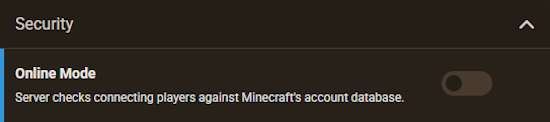
- Go back to the
FTP File Accessarea, then enter theconfigdirectory.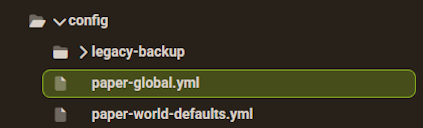
- Open the paper-global.yml file. In the proxies section (Velocity) edit this:
secret: ‘Paste Your Key Here’
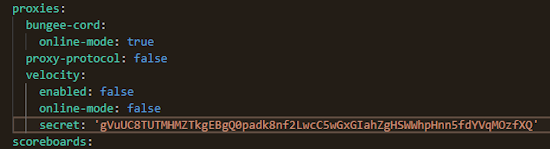
- Save the changes. Repeat this process for all your other backend servers.
- When you’re finished, restart all servers.
- Try connecting to the proxy server to test if this worked.
BungeeCord Setup
👉 For more information, review this guide.
- Go to your Apex server panel. Stop the proxy server.
- Click the
Game File>option. Search for BungeeCord. - Select it and confirm the prompts. Restart the server once to generate new files.
- Go to
File Management > FTP File Accesson the left menu. - Open config.yml by double-clicking it.
- Adjust these settings:
host: Set the port to match your proxy’s assigned port.ip_forward: Change this setting fromfalsetotrue.priorities: Put your default lobby server first in the list.servers: Enter your backend server names, IP addresses, and ports.
- Save the file.
Backend Server Setup
- Open your backend server on the Apex panel (such as the Lobby).
- Stop the server. Click
Server Configuration > Config Fileson the left. - Open Server Settings. Set Online Mode to disabled (
false). Save the file. - Go to
FTP File Access. Open the spigot.yml file. - Find the settings section. Change
bungeecordfromfalsetotrue. - Save your changes. Repeat these steps on all other backend servers.
- Start all backend servers first. Then, start your BungeeCord proxy server.
- Connect to your proxy IP in Minecraft to confirm it works.
Conclusion
Both Velocity and BungeeCord make scaling a Minecraft server network straightforward. For modern versions running on Paper (1.13+), Velocity provides better performance, superior thread handling, and native forwarding security. If you manage legacy versions or rely on classic BungeeCord plugins, BungeeCord remains a reliable choice when paired with appropriate backend firewall protections.