If you want your Hytale server to be publicly discoverable in the server discovery, manual authentication is required. This quick and secure process links your server to your Hytale account, verifying ownership and enabling access to official services. Manual authentication is not required to host or join a server, as Apex Hosting already authenticates it for you. In this guide, we’ll walk you through how to authenticate your Hytale server 👏
⚠️ Only manually authenticate your Hytale server if you want to use the server discovery.
How to Authenticate My Hytale Server
- Head towards your Apex server panel for the Hytale server.
- Navigate to
Server Configuration > Customizationson the left.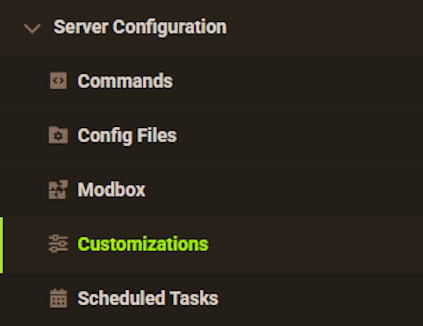
- Toggle the
Disable GSP Authoption at the top, then restart the server.
- After it comes online, navigate to
Server Management > Console.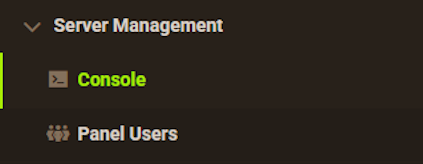
- Enter “auth login device” in the text box and copy / paste the URL in your browser.
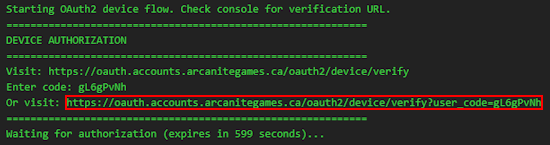
- Sign into your Hytale account and authenticate the server.
- Wait for a successful authentication, then return to the server panel.
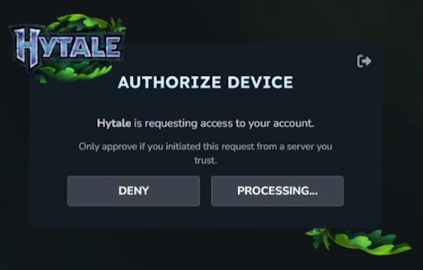
- Check the
Consoleto verify that your Hytale server has been authenticated.
Hytale Server Authentication – FAQ
Why do I need to authenticate my Hytale server?
Manual authentication is only required if you want to use the in-game server discovery list. Your Hytale account must be the same one as the server profile you created for it. Besides this, Apex Hosting handles all the backend authentication for you.
Why am I unable to authenticate my Hytale server?
In cases where you cannot authenticate, Hytale services may be offline for maintenance or at heavy load. Please wait and try again later.
Hytale Authentication
If you don’t want the server to be in the list, then this authentication is not required. Apex Hosting already does it for you, as it is required for players to access the server via IP:Port. Besides this, your Hytale server can be live, discoverable, and ready for adventure in the world of Orbis in just a few steps 🔥