

Earn commissions more efficiently with Apex Hosting Partner Link, a mod designed for Fabric, Forge, and NeoForge. This creates a smooth experience for your players to host their own servers with your modpack. With a quick setup, you can have your affiliate information and modpack be used at checkout. This is intended for official partners, apply now if you’re interested. In this quick guide, we will show you how to set it up and provide extra details about the mod.
Getting Started
Before anything, you need to have some details ready when setting up the mod.
Finding Your Affiliate ID / Link
- Log in to the Apex Hosting Billing Panel.
- Find the “Affiliate Program” box and select “More Details”.
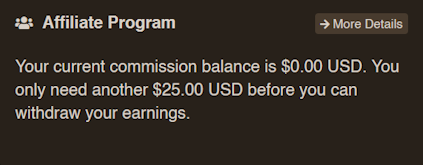
- Locate your unique affiliate link.
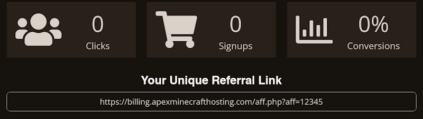
- Your affiliate ID is the sequence of digits after “aff=” in the link.
- Save this for later use.
- Contact your partner manager if you need assistance.
Finding Your Modpack ID
- Navigate to your CurseForge or Modrinth modpack page:
- CurseForge: Copy the
Project IDon the right.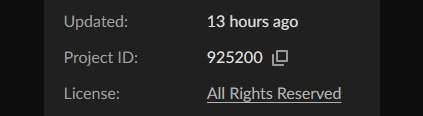
- Modrinth: Click “More Options” at the top and
Copy ID.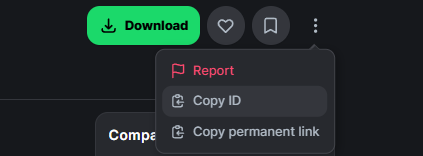
- CurseForge: Copy the
- Save this ID for later use.
Installation
- Download Apex Hosting Partner Link from CurseForge or Modrinth.
- Drag & drop the .jar file in your
modsfolder for the modpack. - Launch the modpack once to generate the config file.
- Enter the
configfolder and findapexhosting-partner-link.properties.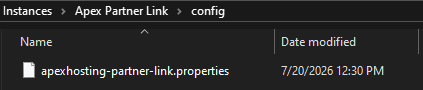
- Open the file with an editor, such as Notepad.
- Add your
Affiliate ID,Project ID,Modpack Name,Minimum/Recommended RAMaccordingly.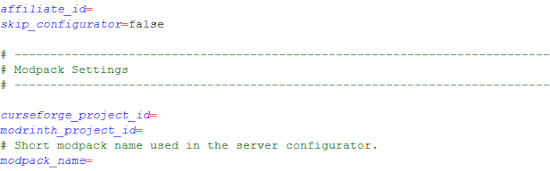
You also need to fill in the
Server Versionin order for your modpack to be preinstalled for customers. This refers to the name of the main JAR file of your modpack in our internal system. You can find this name in a server panel with your modpack installed, or ask your partner manager for assistance. The server version is configured by your partner manager when your modpack gets onboarded to our system. - Save the changes, then launch the modpack again.
- Head towards
Multiplayer, then click the Apex Hosting button.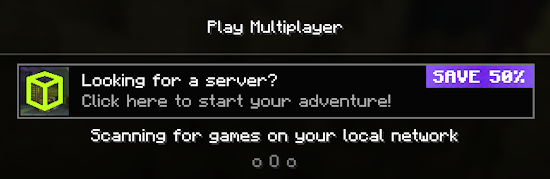
- Click
Rent Serverto test if it worked properly.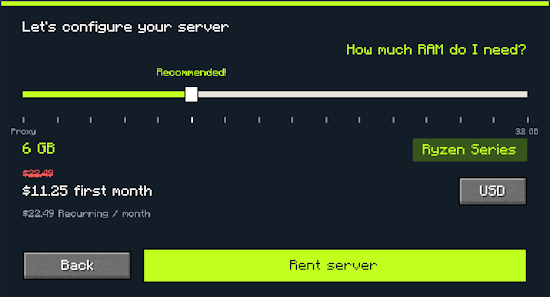
- If successful, you’ll be redirected to checkout with your affiliate and modpack.
Configuration
| Setting | Description |
|---|---|
| currency | The currency displayed when choosing a server plan |
| show_button | Toggle if the Apex Hosting button is shown in the server list |
| affiliate_id | Your specific Affiliate Program ID |
| skip_configurator | Toggle if the Apex Hosting button opens the affiliate link directly |
| curseforge_project_id | Your Modpack ID from CurseForge |
| modrinth_project_id | Your Modpack ID from Modrinth |
| modpack_name | Shortform name of your modpack used when configuring a server |
| server_version | Internal name of the modpack JAR used to preload the modpack during checkout |
| discount_code | Your own discount code, if you have one |
| discount_code_value | Value of the discount code in percent (1-100) |
| minimum_ram | Set the minimum RAM when configuring a server |
| recommended_ram | Set the recommended RAM when configuring a server |
FancyMenu Integration
You may also integrate Apex Hosting Partner Link to open from any button with other mods, such as FancyMenu. Follow these quick steps to implement that:
- In the FancyMenu Editor, right-click a button.
- Select
Edit Action Script, then press ‘A’ on your keyboard. - Choose
Open Screen or Custom GUIonce found. - Enter:
com.apexhosting.partnerlink.ApexPartnerLinkScreen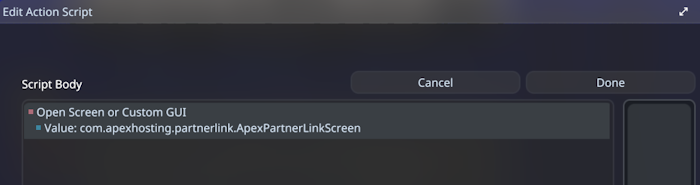
- Click Done at the top to save these changes.
FAQ
What is the Apex Hosting Partner Link mod?
It’s a mod designed for official partners that adds an in-game button to allow players to purchase servers using your affiliate link or ID.
What does the player see in-game?
They will see a button in the Multiplayer menu and upon clicking it, a server configurator will appear for them to select RAM and continue to checkout.
Which mod loaders are supported?
The Apex Hosting Partner Link mod supports Fabric, Forge, and NeoForge.
Will my modpack be pre-installed for players?
Yes! You can enter your modpack’s server_version in the config file, which will pre-install the modpack for players.
Can I use a different logo or wordmark than the CurseForge/Modrinth one?
Yes! If you drop a logo.png in the config/apexhosting-partner-link folder, it will get used instead.






















