


Every level in ARK: Survival Ascended hands out one stat point, and by default the payoff behind that point is identical on every unofficial server. That’s why a melee build takes forever to feel strong, and why a full loadout still runs out of weight one trip too early on a server that hasn’t touched its settings. A small set of values in one config file, called PerLevelStatsMultiplier, changes that payoff, deciding how much a single point actually raises a stat, for players and for dinos, tamed or wild. Get it right and leveling finally feels like it matches how your tribe actually plays.
What PerLevelStatsMultiplier Actually Changes
PerLevelStatsMultiplier does not touch a character’s starting stats, and it does not hand out extra points to spend. It changes what one point is worth. Put a point into Weight at the default value and a player gets the base game’s usual gain; raise the multiplier to 2.0 first, and that same point doubles the gain instead. How many points a player or dino earns, and which stats exist, stay exactly the same.
That’s a different job from base stat settings, which decide what a fresh level 1 character or a freshly spawned dino starts with before anyone has spent a single point. PerLevelStatsMultiplier only affects growth from that starting point onward, one level at a time.
The setting comes in five variants, covering players, wild dinos, and three angles on tamed dinos. All five work on the same principle: 1.0 is the unmodified default, a higher number grows the stat faster per point, and a lower number slows it down. Nobody is choosing a new formula, just scaling the one already running on the server.
Player Stat Index Reference
Every stat these settings touch has a fixed index number, and the number is what actually goes in the config line, not the stat’s name. Get the index wrong and the server changes a different stat, with no error to flag it.
| Index | Stat |
|---|---|
| 0 | Health |
| 1 | Stamina |
| 2 | Torpidity |
| 3 | Oxygen |
| 4 | Food |
| 5 | Water |
| 6 | Temperature |
| 7 | Weight |
| 8 | Melee Damage |
| 9 | Movement Speed |
| 10 | Fortitude |
| 11 | Crafting Speed |
Torpidity (index 2) is not one of the stats a player chooses in the level-up menu. It climbs automatically as a character levels, and it climbs faster once points go into Fortitude, so PerLevelStatsMultiplier_Player[2] adjusts how quickly that automatic rise happens rather than a stat anyone allocates directly. Temperature (index 6) works the same way: Fortitude is the stat players actually spend points on to handle heat and cold. Both indices still exist in the array and both settings still function. But neither shows up as its own line in the level-up menu, so changing them adjusts a background rate rather than a stat your players will notice in their point-spending screen.
The Five PerLevelStatsMultiplier Settings Explained
PerLevelStatsMultiplier_Player controls players only. Every index above applies to whoever is logged in and spending points on their own character, and nothing here touches a single creature on the map.
PerLevelStatsMultiplier_DinoWild sets how much a wild, unridden creature’s stats climb as it levels up naturally. Raise this and even a fresh, untamed level 150 Rex hits harder and carries more health before anyone has thrown a tranq dart at it.
PerLevelStatsMultiplier_DinoTamed governs the gain from level-up points spent on a creature after taming, the same points a tribe assigns from the radial menu once a dino is riding-ready. It’s the lever for tribes who want taming to matter more once the work is already done.
PerLevelStatsMultiplier_DinoTamed_Add adjusts the bonus levels a creature picks up purely from being tamed, stacked on top of whatever it rolled in the wild.
PerLevelStatsMultiplier_DinoTamed_Affinity scales the extra stat bonus tied to taming effectiveness, so a near-perfect tame gets noticeably more out of this multiplier than a rushed one. Breeding-focused tribes tend to reach for this one first, since it rewards the effort put into a clean tame.
All five default to 1.0, and all five live in the same file. Raising one without touching the others is the normal way to rebalance one side of the game, taming rewards, say, without changing how tough wild spawns are.
Where to Edit These Settings on Your Apex Server Panel
All five settings belong in Game.ini, under the [/Script/ShooterGame.ShooterGameMode] header, not in GameUserSettings.ini where most day-to-day server options live.
Head towards your Apex server panel and open Server Configuration, then Config Files. That list shows every editable configuration file for an ARK: Survival Ascended server side by side, and two entries share almost the same name, which makes it easy to click the wrong one. Choose ARK Additional Server Configuration, since that editor is the one that actually writes to Game.ini. The similarly named ARK Server Configuration entry edits GameUserSettings.ini instead, and a PerLevelStatsMultiplier line pasted there does nothing.

Once the editor is open, paste your settings under the [/Script/ShooterGame.ShooterGameMode] header. Add that header as its own line first if it is not already present. Everything below it belongs to that section until the next header starts.
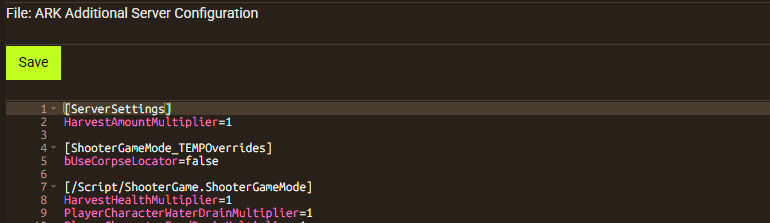
Save your changes, then restart the server to apply them. PerLevelStatsMultiplier only takes effect after a restart, so saving alone leaves the server running on whatever was already loaded into memory. For the rest of the config files available on an ARK: Survival Ascended server, the ARK: Survival Ascended knowledgebase hub covers the full set.
Worked Example: Doubling Weight and Melee Gain per Level
Say a tribe wants noticeably heavier loadouts and harder-hitting melee, without touching any other stat. Weight is index 7 and Melee Damage is index 8, so the two lines needed are:
[/Script/ShooterGame.ShooterGameMode]
PerLevelStatsMultiplier_Player[7]=2.0
PerLevelStatsMultiplier_Player[8]=2.0
By default, a point in Weight adds 10 units of carry capacity, and a point in Melee Damage adds a 5% damage boost. At 2.0, those numbers double to 20 units and 10% per point, compounding across every level a player earns. Leave every other index alone, and Health, Stamina, Oxygen, Food, Water, Movement Speed, Fortitude, and Crafting Speed all keep gaining at the normal rate.
Want the same treatment for tamed dinos instead of players? Swap the setting name and keep the index: PerLevelStatsMultiplier_DinoTamed[7]=2.0 does the same job for a tamed creature’s weight gain.
To confirm the new gain instantly instead of leveling up the slow way, our guide on how to become admin on ARK: Survival Ascended servers covers turning on cheats so a command like LevelUp can test the result in seconds.
Common Mistakes to Avoid with PerLevelStatsMultiplier
Wrong stat index. Mixing up index 7 and index 8, or reaching for 10 (Fortitude) when the goal was 11 (Crafting Speed), is an easy error to make, and the game does not warn anyone when it happens. Double-check the number against the reference table before saving.
Editing GameUserSettings.ini instead of Game.ini. Because ARK Server Configuration and ARK Additional Server Configuration sit right next to each other in the panel’s Config Files list, it’s easy to paste a PerLevelStatsMultiplier line into the wrong editor. The line saves without an error either way; it never does anything in the wrong file.
Forgetting to restart. Saving Game.ini updates the file on disk, not the running server process. Nothing changes for anyone connected until a restart happens, and skipping that step is the most common reason a “broken” setting turns out to be working fine all along.
Assuming the change is retroactive. A point a player or dino already spent keeps the gain that applied at the time. Only points spent after the restart use the new multiplier, so existing high-level characters and dinos will not shift to match a fresh rebalance on their own.
If a setting looks correct in the file but still is not showing up in-game after a restart, our 24/7 Support Team can check the server-side logs for a syntax issue that might have slipped through.
Frequently Asked Questions
Does Changing the Multiplier Affect Levels Already Spent?
No. A level-up point locks in whatever gain the multiplier gave at the moment it was spent. Changing PerLevelStatsMultiplier_Player afterward only changes what future points are worth, for that character and for everyone else on the server going forward. Rebalancing stats a tribe already has really means starting fresh characters or dinos under the new values.
What Does a Multiplier of 0 Do?
Less than most people expect. Setting a value to exactly 0 can behave unexpectedly. On many servers the game falls back to the default of 1.0 instead of switching the stat’s growth off, so the gain does not disappear the way it looks like it should. If the goal is a stat that barely moves, use a very small value like 0.01 instead of 0. That produces close to no gain per point without tripping the default fallback.
Can These Multipliers Use Decimal Values?
Yes, and most servers that customize this setting use decimals rather than whole numbers. A value of 1.5 gives 50% more than default, 0.5 gives half, and 0.01 is the practical floor for “almost nothing” described above. Whole numbers like 2 or 3 work too; the game reads them the same way.
Does This Change the Server’s Level Cap?
No. PerLevelStatsMultiplier only changes what a point is worth, not how many points a character or dino can ever earn. The level cap comes from separate experience settings. So a server that wants both bigger per-level gains and a higher cap needs to configure both.






















