Overview
In the world of Minecraft servers, a decent spawn point is vital for players looking to get started. Whether this is a resource-rich biome in vanilla or a hub for servers, the spawn is where the first impression is made. While the base game has commands relating to a spawn point, there are many options that are missing. This is solved with EssentialsX Spawn, an addon plugin that revamps the spawn and respawn mechanics for your server. From a customized first-join message to a variety of configurations, EssentialsX Spawn has you covered. Installing plugins is easy with our Apex Hosting panel uploader, so we have created this guide to help you get started.
Summary
EssentialsX Spawn is an addon for the base EssentialsX that adds access to commands and configurations relating to the spawn point on the server. The plugin allows you to adjust the welcome message as well as a variety of factors relating to respawning. The plugin is compatible across many versions, so in most cases one download will fit all.
Modbox Installation
IMPORTANT: Make sure to have Spigot or Paper selected in the Game File option on your server panel so plugins can work properly.
- Head towards your Apex server panel for the server.
- Navigate to
Server Configuration > Modboxon the left.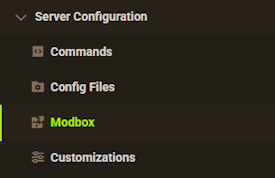
- Choose the version and search for the plugin you want, then select it.
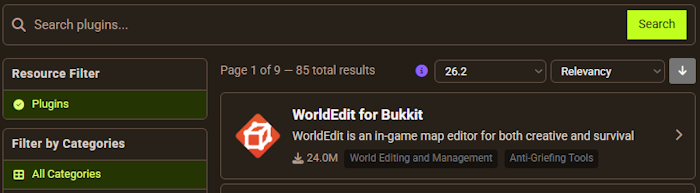
- Click
Installon the left and wait for it to be installed. - Restart the server to load the plugin. Repeat this process for any other plugins.
Manual Installation
Download EssentialsX and follow these steps:
- Download the plugin file from the link above.
- Head towards your Apex server panel for the server.
- Locate the Game File option, then select Spigot or Paper if you haven't already.
- Navigate to
File Management > FTP File Accessand login. - Drag + drop the .jar file in the
pluginsdirectory. Alternative: Click theUploadbutton and select the file. - Wait for this to finish, then return to the main panel.
- Restart the server and the plugin should load properly once you join.
Getting Started
The in-game usage for EssentialsX Spawn is extremely simple, with only 2 main commands to use.
Setting Spawn

To set a spawn point for the server, make use of the /setspawn command. This will mark your current placement and direction for the server’s spawn point. Since the direction is included, you may want to position your character to point towards a welcome sign or more.

To return to spawn at any time, you can use the /spawn command. This will return you to the exact spot that the command was used. Alternatively, you can use /spawn [Player] to send a specific person back to spawn.
Configuration Options
While the command usage may seem miniscule, there are also a variety of configurations that can be changed for your server as well. Many of these relate to respawn mechanics and whether you want players to always end up at spawn or their own beds.
- In the left-hand menu, log into the FTP File Access.
- Enter the
Pluginsfolder, then theEssentialsfolder.
- Locate the
config.ymlfile, then pressEditto the far-right. - Scroll down to the
EssentialsX Spawn + New Playerssection.
There are many options that are available for customization:

announce-format: – The configurable message that displays in-game when a new user joins the server.
kit: – The defined kit of items and blocks to be sent to any new player.
respawn-at-home: – Controls if a person respawns at their set home.
respawn-at-home-bed: – Toggles if a player respawns at their bed instead of the home.
respawn-at-anchor: – Dictates if the user should spawn at their anchor instead of the set home.
spawn-on-join: – Whether a player is sent to the spawn point every time they join.
Permissions
| Command | Permissions | Description |
|---|---|---|
| /setspawn | essentials.setspawn | Allows access to /setspawn. |
| /spawn | essentials.spawn | Allows access to /spawn. |
| /spawn [Player] | essentials.spawn.others | Teleport others to spawn. |
| N/A | essentials.spawn-on-join.exempt | Exempt from teleporting on join. |
Conclusion
With that, you now know how to install and use the EssentialsX Spawn addon. While the plugin does not achieve a ton on its own, it can be great for the standalone features or to use in conjunction with the core EssentialsX plugin. Having a spawn point for a hub area is great, allowing players to easily enter spawn to open crates, use shops, and much more. If you wish to change any of the settings later on, you can simply readjust the config file at any time. With this newfound knowledge of how to install and use EssentialsX Spawn, you are ready to create your perfect spawn point and jump into the action!